Popular Courses

Brand
Awarding body image

Key Features of Maya & Unity 3D: Modeling Environments For Mobile Games

Build Strong Career Skills in 3D Environment Design

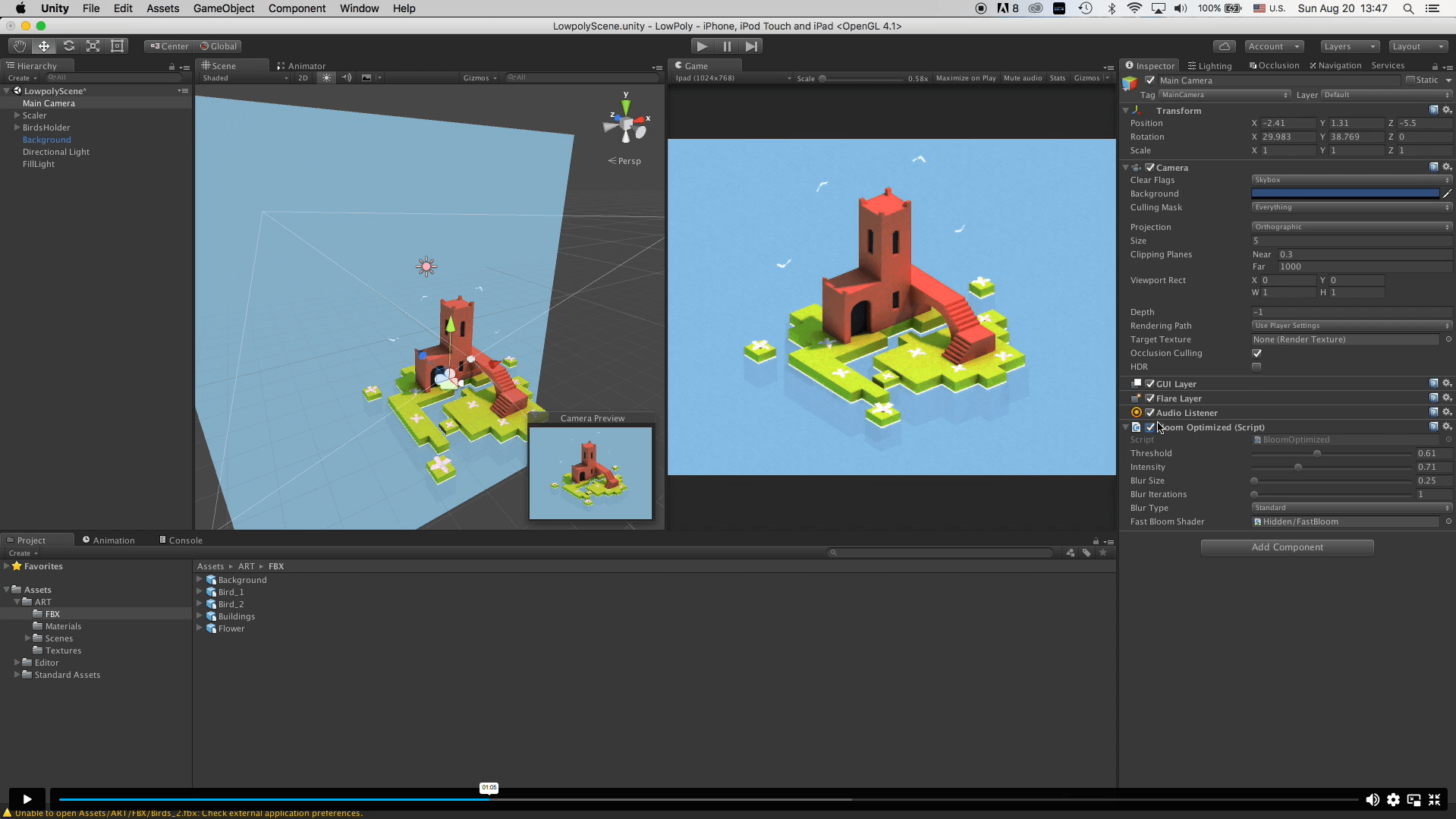
Working through a full project, rather than isolated tutorials, gives you a much stronger sense of how environment art actually fits into a real production pipeline. You will gain hands-on industry knowledge of how Maya assets move into Unity, how scenes are dressed and lit, and how small polish details, such as camera effects and baked lighting, change the overall feel of a game. Consequently, you build genuine practical ability rather than surface-level familiarity with the software. This, in turn, gives you the professional confidence to apply these workflows to your own original mobile game projects or studio briefs.

By completing this course, you will be able to:

  • Model a complete 3D island base using Maya’s core toolset
  • Construct detailed buildings and structural assets for a game scene
  • Unwrap UVs efficiently and apply realistic materials and textures
  • Populate an environment with smaller assets such as flowers and birds
  • Export Maya models cleanly for use within Unity
  • Import and configure a 3D project correctly inside Unity
  • Add meshes to a Unity scene and manage scene hierarchy
  • Apply materials and textures directly within Unity
  • Set up cameras and lighting to establish mood and atmosphere
  • Bake light maps and add camera effects to finish a scene

Exclusive Course Glimpse

Learning Outcomes

By the end of this course, you will be able to confidently move a 3D environment from concept to a finished, lit Unity scene. Specifically, you will be able to:

  • Understand the full Maya-to-Unity asset pipeline used in mobile game development
  • Apply UV unwrapping and texturing techniques to game-ready models
  • Set up cameras and lighting that enhance scene composition
  • Bake light maps to improve visual realism without harming performance
  • Manage asset import and export processes between Maya and Unity
  • Recognise good environment design principles for mobile platforms

Why Choose This Course

This course is built for learners who want practical, transferable 3D skills rather than abstract theory. To begin with, every module contributes to one finished project, so progress feels tangible from lesson to lesson.

  • Project-based learning that mirrors real studio workflows
  • Directly relevant to mobile and indie game development roles
  • Suitable for complete beginners and improving intermediates alike
  • Flexible, self-paced online study with lifetime-style access
  • Step-by-step lessons that build logically from modelling to lighting
  • Strengthens your CV with a CPD-accredited, employer-recognised certificate
  • Builds a genuine portfolio piece, not just completed checkboxes
  • Supports UK learners working toward game industry roles

Certificate of Achievement

  • CPD Accredited Certificate
  • Digital Certificate
  • Professional Recognition
  • CV & LinkedIn Enhancement
  • Proof of Professional Skills in 3D Environment Design
Nextgen Certificate

Who Is This Course For?​

  • Beginners with no prior 3D modelling experience
  • Aspiring 3D environment artists and game artists
  • Hobbyist game developers building their own mobile titles
  • Graphic designers wanting to move into 3D and game art
  • Career changers exploring the games industry
  • Freelancers offering 3D asset creation services
  • Students studying game design, art, or animation
  • Anyone wanting practical Maya and Unity skills

Career Opportunities (UK)

Learning Maya-to-Unity environment workflows opens the door to several roles across the UK games industry, particularly within mobile and indie studios where artists are often expected to handle modelling, texturing, and basic lighting themselves. Below are some of the most relevant career paths this course supports.

Junior 3D Environment Artist 

Junior environment artists build and refine game scenes under the guidance of senior team members, focusing on modelling, UV unwrapping, and texturing. This course mirrors the exact workflow used in entry-level studio briefs, making it an excellent foundation for this role. Average UK Salary: £20,000 – £28,000 per year

Game Asset Designer 

Asset designers create individual props, structures, and environmental pieces that populate a game world, often working closely with art directors to maintain visual consistency. Strong UV and texturing skills, as covered in this course, are essential to this role. Average UK Salary: £24,000 – £34,000 per year

Mobile Game Developer (3D Focus) 

Mobile game developers with 3D specialisms build playable environments optimised for phones and tablets, balancing visual quality with performance. This course’s focus on efficient Maya-to-Unity workflows directly supports the optimisation skills mobile development demands. Average UK Salary: £30,000 – £45,000 per year

3D Modeller for Games 

3D modellers translate concept art and design briefs into finished, game-ready assets, often working across multiple projects simultaneously. The modelling techniques taught in this course, from island bases to detailed buildings, reflect this role’s day-to-day demands. Average UK Salary: £25,000 – £38,000 per year

Environment Artist (Mobile Games) 

Environment artists are responsible for the overall look, lighting, and atmosphere of a game world, combining modelling, texturing, and lighting into a cohesive scene. This course’s complete project structure, from base terrain to light map baking, closely reflects this specialism. Average UK Salary: £28,000 – £42,000 per year

Technical Artist (Maya/Unity) 

Technical artists bridge the gap between art and engineering, managing asset pipelines, lighting setups, and performance optimisation between Maya and Unity. Learners who enjoy the export and import stages of this course often progress well into this more technical specialism. Average UK Salary: £35,000 – £50,000 per year

Entry Requirements

  • No formal qualifications required
  • Suitable for complete beginners
  • Basic understanding of English
  • Access to a computer capable of running Maya and Unity
  • An interest in 3D modelling, game design, or digital art

Order Your Certificate

To order your Certificate, we kindly invite you to visit the following link

Frequently Asked Questions -

 This course teaches you how to build a complete mobile game environment using Maya and Unity, from initial island modelling through to a fully lit, polished scene. You will learn modelling, UV unwrapping, texturing, lighting, and the asset export and import process between both pieces of software. As a result, you finish with a real, exportable project rather than fragmented exercises. The skills covered reflect genuine industry workflows used by environment artists in mobile and indie studios.

 It suits absolute beginners, hobbyist developers, and creative professionals looking to specialise in 3D environment design. Likewise, students studying art, animation, or game design will find the structured, project-based format particularly useful. No prior experience with Maya or Unity is required to get started. Anyone with a genuine interest in building game worlds can follow the course comfortably.

Yes, this course is fully CPD accredited, giving you a recognised certificate to support your professional development. Therefore, the qualification carries credibility with UK employers and training providers alike. This adds genuine value to a CV or portfolio submission. The certificate also demonstrates structured, verified learning rather than informal self-study.

Absolutely. The course begins with foundational modelling steps and builds progressively toward more advanced lighting and polish techniques. Consequently, learners with no previous Maya or Unity experience can follow each module without feeling overwhelmed. More experienced learners will also benefit from the structured Maya-to-Unity workflow demonstrated throughout.

The course is made up of twelve modules covering the full environment creation process, and most learners progress through it within a few focused study sessions. However, you can study entirely at your own pace, fitting lessons around other commitments. There are no fixed deadlines or live class times. This flexibility makes the course accessible alongside work, study, or other projects.

This course supports entry into roles such as junior 3D environment artist, game asset designer, and mobile game developer with a 3D focus. Similarly, it provides a strong foundation for technical artist or 3D modeller positions within indie and mobile studios. While the course does not guarantee employment alone, the finished project strengthens your portfolio significantly. It also demonstrates practical, job-relevant Maya and Unity competency to potential employers.

Yes, the course is delivered 100% online and can be studied from any compatible computer with Maya and Unity installed. As a result, you can learn from home or any location that suits your schedule. There are no in-person classes or fixed attendance requirements. This makes the course ideal for self-paced, flexible learning.

 By completing a full Maya-to-Unity project, you demonstrate practical, job-ready environment art skills rather than theoretical knowledge alone. Furthermore, the CPD-accredited certificate adds recognised value to your CV, portfolio, and LinkedIn profile. The finished scene also gives you genuine, demonstrable work to show prospective employers or clients. Ultimately, this combination of certification and portfolio evidence strengthens your position when applying for environment art or 3D modelling roles.

Course Curriculum

Maya & Unity 3D: Modeling Environments for Mobile Games
Module 01: Get To Know Your Instructor and the Course 00:02:00
Module 02: Modeling the Base of the Island 00:17:00
Module 03: Modeling the Buildings 00:36:00
Module 04: Unwrap, Texture And Apply Materials 00:14:00
Module 05: Add Flowers, Birds and Background 00:13:00
Module 06: Export the Models from Maya to Unity 00:05:00
Module 07: Import and Setup the Project in Unity 00:04:00
Module 08: Add Our Mesh to the Scene 00:05:00
Module 09: Materials and Textures 00:06:00
Module 10: Setup Camera and Lightning 00:06:00
Module 11: Bake the Light Map 00:08:00
Module 12: Add Camera Effect to Polish the Scene 00:03:00
Order Your Certificate
Order Your Certificate 00:00:00

Related Courses

No course found

A product of

© 2026 NextGen Learning. All rights reserved

Home Search Cart Offers
Select your currency
GBP Pound sterling