




Excel Skills for Beginners: How to Get Started and Why It Matters
In today’s fast-paced digital workplace, being proficient in Microsoft Excel is one of the most valuable skills you can develop. Excel allows users to organize, analyze, and visualize data efficiently, making it one of the most widely used productivity tools worldwide (Microsoft Excel Official Site).
Even as a beginner, learning Excel can help you:
- Boost productivity by automating calculations and organizing information.
- Communicate insights clearly through charts, graphs, and visualizations.
- Increase employability in virtually any industry, from finance to marketing.
Whether you’re a student, recent graduate, or professional exploring new skills, this guide provides essential steps to get started with Excel, practical exercises, and resources to develop career-ready skills.
Table of Contents
What Are Microsoft Excel Skills?
Microsoft Excel skills refer to the ability to use spreadsheet tools effectively to organise, manage, and analyse data in a structured way. As part of the Microsoft Office – MS Word, Excel, Access & PowerPoint course, Excel plays a vital role in helping learners work with data confidently and efficiently in real-world tasks.
Excel allows users to input, format, and manipulate data, perform calculations using formulas and functions, and present information through charts, tables, and dashboards. These skills are widely used in business, finance, administration, education, and many other industries where data-driven decisions are important.
With strong Excel skills, learners can turn raw data into meaningful insights, identify trends, automate repetitive tasks, and create professional reports. This improves productivity, accuracy, and decision-making in the workplace.
Typically, Excel skills are divided into three levels:
- Basic: Data entry, formatting, simple formulas, and basic charts
- Intermediate: Functions (e.g., IF, VLOOKUP), data sorting, filtering, and conditional formatting
- Advanced: Pivot tables, data analysis tools, automation, and advanced functions
Developing these skills as part of a complete Microsoft Office training helps learners build a strong foundation for both academic and professional success.
Practical Exercises for Beginners
Learning by doing is the most effective way to build Excel skills. Here’s a simple beginner-friendly exercise:
Exercise: Create a Personal Budget Sheet
- Open a blank workbook.
- Enter 5 expenses (e.g., Rent, Groceries, Utilities, Transport, Entertainment) in column A.
- Enter corresponding amounts in column B.
- Use =SUM(B1:B5) to calculate the total.
- Format your table with colors, borders, and headings.
- Insert a pie chart to visualize spending distribution.
Skills Practiced:
- Data entry
- Basic formulas
- Formatting
- Charts and visualization
Small exercises like this give beginners hands-on experience and make learning more engaging. The key is consistent practice building muscle memory for Excel operations is the fastest way to gain confidence.
Exercise 2: Track Your Study or Work Hours
- Open a new workbook.
- Create columns for Date, Task, Start Time, End Time, and Duration.
- Use =End Time – Start Time to calculate time spent on tasks.
- Apply conditional formatting to highlight tasks exceeding a set time.
- Insert a bar chart to visualize daily productivity.
Skills Practiced:
- Time calculations
- Conditional formatting
- Basic reporting and charting
Intermediate Excel Skills
Once you’re comfortable with the basics, intermediate skills help you analyze data and present it effectively. Key intermediate skills include:
- Pivot Tables – Summarize large datasets efficiently.
- Charts and Data Visualization – Convert raw data into visual insights.
- Conditional Formatting – Automatically highlight trends or important values.
Intermediate skills allow users to make sense of data, support decision-making, and communicate insights clearly—skills that employers highly value (Microsoft Excel Documentation).
Practical Use Cases:
- Monthly sales reporting
- Marketing campaign performance tracking
- Academic research data analysis
Basic Excel Skills
Basic skills are essential for beginners and provide a strong foundation. Key areas include:
- Data Entry – Input and organize information within rows and columns.
- Formatting Spreadsheets – Adjust fonts, colors, and cell layouts to improve readability.
- Basic Formulas – Use functions like SUM, AVERAGE, and COUNT for simple calculations.
- Sorting and Filtering – Quickly organize and locate specific information.
Practical Use Cases:
- Tracking personal budgets
- Maintaining simple contact lists
- Managing small project data
Even mastering these basics gives beginners a boost in confidence and workplace readiness.

Why Learning Excel Skills Matters for Beginners
Even as a beginner, learning Excel has immediate and long-term benefits.
1. Boost Productivity
Excel automates repetitive calculations and organizes large datasets, saving time and minimizing errors. Simple functions like SUM, AVERAGE, and COUNT reduce manual calculations, while features like sorting and filtering allow you to quickly navigate complex datasets.
2. Enhance Analytical Skills
With tools like pivot tables, conditional formatting, and charts, beginners can visualize data and spot trends, helping make data-driven decisions—even at an entry-level role.
3. Increase Employability
Entry-level jobs increasingly require basic Excel skills, from office administration to marketing and finance (LinkedIn Top Skills 2024). Employers look for candidates who can efficiently manage data, generate reports, and provide actionable insights.
4. Prepare for Career Growth
Mastering Excel basics early allows you to transition into intermediate and advanced Excel skills. This opens doors to roles such as:
- Data Analyst
- Business Analyst
- Operations Manager
- Finance Executive
By starting early, you set a foundation for long-term career success.

How to Start Learning Excel Effectively
While free tutorials and online guides are helpful, structured courses accelerate learning and provide a comprehensive understanding of workplace applications. One of the best options for beginners is the Microsoft Office Specialist (MOS) course.
Benefits of MOS Training:
- Step-by-step guidance in Excel, Word, PowerPoint, and Access
- Real-world exercises that mirror professional tasks
- Practical tips to quickly build confidence
- Certification to showcase your skills to potential employers
Structured learning ensures that you practice with purpose, gain hands-on experience, and acquire career-ready skills faster than self-learning. You can explore the full MOS course here: NextGen Learning MOS Course.
Next Steps for Beginners: Advancing Your Excel Skills
Once you’ve mastered the basics, you can progress to intermediate and advanced Excel skills:
- Pivot Tables, VLOOKUP, and Conditional Formatting – Deeper data analysis for business insights.
- Charts, Dashboards, and Data Visualization – Communicate insights effectively.
- Macros or VBA – Automate repetitive tasks to save time.
The MOS course covers these advanced techniques, allowing beginners to gradually build expertise and become workplace-ready. Advanced learners can then move into specialized Excel applications for finance, analytics, or project management.
Tips for Continuous Excel Learning
- Set Practical Goals: Track personal or work-related projects using Excel.
- Practice Daily: Even 15–20 minutes a day improves proficiency.
- Use Templates: Explore Excel templates for budgeting, project management, and analytics.
- Participate in Online Communities: Forums like Reddit’s r/excel or Microsoft Tech Community help solve real-world problems.
Challenge Yourself: Try recreating dashboards or automating tasks using Macros.
Career Applications of Excel Skills
Excel skills are universally applicable and can significantly enhance your professional profile. Examples include:
- Finance and Accounting: Budgeting, forecasting, and financial modeling.
- Marketing: Campaign analytics, KPI tracking, and visualization.
- Operations: Resource planning, project tracking, and workflow optimization.
- Education and Research: Data analysis, grading, and reporting results.
Employers highly value candidates who can quickly interpret data and produce actionable insights. Even a beginner with strong foundational Excel skills can stand out in entry-level roles.
Recommended Resources for Beginners
While the MOS course provides structured learning, these additional resources are also helpful:
- Microsoft Excel Official Documentation: Comprehensive guides for formulas, charts, and functions (Link).
- Excel Easy Tutorial: Beginner-friendly tutorials and exercises.
- YouTube Excel Channels: Visual walkthroughs for formulas, dashboards, and automation.
Practice Workbooks: Real-world Excel files to test your skills.
Advanced Excel Skills
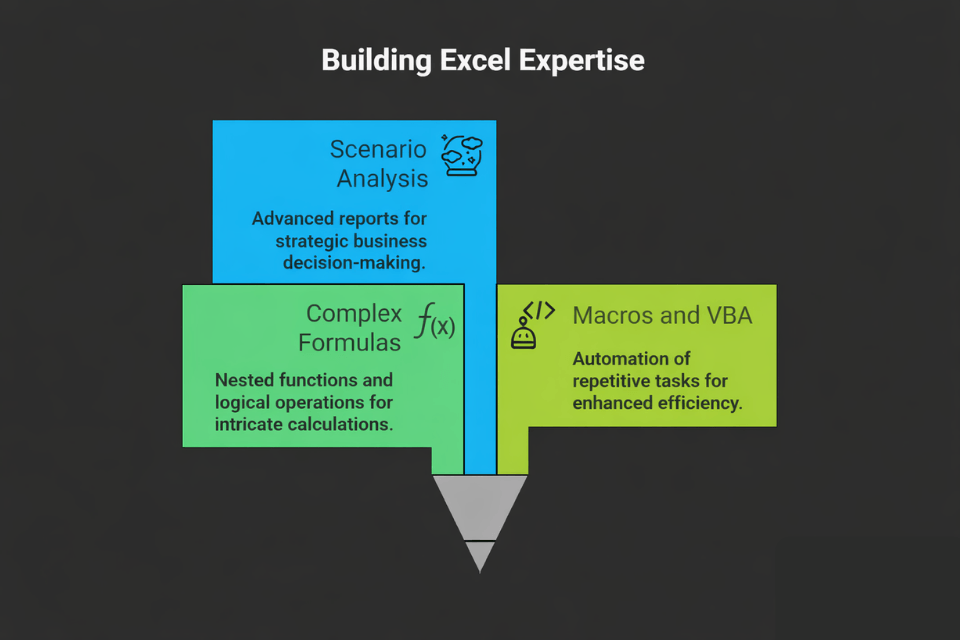
Advanced Excel skills focus on complex calculations, data analysis, and automation. Examples include:
- Complex Formulas – Nested functions and logical operations.
- Macros and VBA – Automate repetitive tasks for efficiency.
- Scenario Analysis & Data Modeling – Create advanced reports for business strategy.
Professionals with advanced Excel skills can build dashboards, perform financial analysis, and generate business intelligence reports, making them highly sought after in any industry (Microsoft Excel Advanced Training).
Practical Use Cases:
- Financial forecasting
- Business performance dashboards
- Automating repetitive reporting tasks
Conclusion: Build Your Excel Skills Today
Starting with Microsoft Excel skills for beginners is the first step toward:
- Boosting productivity
- Improving data analysis
- Unlocking career opportunities
By practicing core skills like formulas, charts, and data organization, beginners can develop a strong foundation for professional growth.
Ready to take the next step? Enroll in the Microsoft Office Specialist (MOS) course today to:
- Learn Excel formulas, pivot tables, and charts
- Organize and analyze data efficiently
- Apply practical skills to real-world workplace tasks
- Earn certification to showcase your abilities to employers
Start your Excel journey today and gain the confidence to excel in any professional environment.
Frequently Asked Questions (FAQ)
You will learn the fundamentals of Microsoft Excel, including data entry, formatting, basic formulas, charts, and data organisation. The course also introduces simple analysis techniques to help you work confidently with spreadsheets.
Yes, this course is designed specifically for beginners. No prior experience is required, making it ideal for students, job seekers, and professionals starting their Excel learning journey.
Excel skills help beginners organise data, perform calculations, and present information clearly. These skills improve productivity and are essential for many entry-level roles across industries.
Basic Excel skills can be learned within a few days to a few weeks, depending on your learning pace. Regular practice helps you gain confidence and improve faster.
Yes, even basic Excel skills are used in real jobs such as data entry, administration, customer service, and reporting. These skills are highly valued by employers worldwide.
Yes, you will receive a certificate after completing the course. This can be added to your CV or LinkedIn profile to demonstrate your Excel skills to potential employers.
After mastering the basics, you can move on to intermediate and advanced topics like pivot tables, VLOOKUP, data analysis, and automation to further enhance your career opportunities.

0 responses on "Excel Skills for Beginners: How to Get Started and Why It Matters"