




Benefits of Learning Excel for Career Growth and Productivity
In today’s data‑driven workplace, proficiency in Microsoft Excel skills isn’t just nice to have it’s a competitive advantage. Whether you’re a new entrant to the job market, a mid‑career professional, or someone aiming for a promotion, Excel has become a foundational skill that boosts efficiency, powers data‑informed decisions, and enhances employability across industries.
According to a LinkedIn Workplace Learning Report, Excel consistently ranks among the top software skills employers expect from job candidates, especially in analytical, administrative, and management roles. Excel expertise has also been shown to correlate with increased productivity and higher earning potential in roles that handle data regularly.
This comprehensive guide explores the multiple benefits of learning Excel — from everyday workplace productivity to tangible career growth — supported by real examples, practical insights, and recommendations on how to master critical Excel capabilities.
Table of Contents
Why Microsoft Excel Matters in Modern Workplaces
Before diving into specific benefits, it helps to understand the context: Excel is used everywhere. From startups to multinational corporations — and even nonprofits — professionals rely on Excel to handle data, make decisions, and communicate results.
- Finance and accounting teams use Excel for forecasting, budgeting, and cash‑flow analysis.
- Marketing professionals analyze campaign performance, customer data trends, and ROI.
- Operations teams track supply chains, inventory, and scheduling.
- Human resources manage employee data, payroll processing, and workforce planning.
This widespread use makes Excel one of the most transferrable digital skills in the job market. A strong grasp of Excel puts you ahead of competitors who may have traditional skills but lack practical data competency.
For structured learning that aligns with workplace demands, many professionals choose the Microsoft Office Specialist (MOS) course, which covers Excel deeply alongside Word, PowerPoint, and Access — preparing learners for a range of office‑centric careers (internal link).
How Excel Saves Time
- Formulas and Functions: Instead of recalculating totals every week, formulas like SUM, AVERAGE, and IF automatically update results when input data changes.
- Pivot Tables: Summarize large datasets in seconds compared to hours of manual sorting.
- Keyboard Shortcuts & Templates: Standardize reports and processes to eliminate repeated formatting work.
- Macros & Automation: With macros, Excel can automate repetitive tasks — such as generating monthly expense reports — in a single click.
Case in Point: A junior analyst at a retail firm reported reducing weekly reporting time from 4 hours to under 30 minutes after learning pivot tables and automation features. This time saved allowed them to take on higher‑impact tasks like data interpretation and strategy planning.
For beginners and intermediate learners, these skills are best acquired through structured practice — which is exactly what the MOS course offers with hands‑on modules on formulas, pivot tables, automation, and real workplace data projects .
Improved Accuracy and Reduced Errors
Manual data handling increases the risk of errors — especially when spreadsheets get complex. One misplaced cell or miscalculated formula can lead to incorrect conclusions.
Learning Excel helps you:
- Use error‑checking tools and functions (IFERROR, ERROR.TYPE) to manage mistakes.
- Standardize inputs with data validation to avoid incorrect or inconsistent entries.
- Track errors using audit tools like Trace Precedents/Dependents.
External Reference: According to research by the Carnegie Mellon Software Engineering Institute, data errors in spreadsheets affect up to 88% of complex business models that don’t use structured data controls — a risk that Excel’s validation and auditing tools help mitigate (external link).
This accuracy is especially critical in fields like finance, where a small miscalculation could impact forecasts or budgets. Professionals who can maintain error‑free, reliable spreadsheets are seen as more competent and trustworthy by employers.
Increased Earning Potential and Career Growth
Excel skills can have a direct financial benefit over the course of your career. Employers pay premiums for data‑savvy employees who can:
- Interpret performance data
- Build automated reporting tools
- Identify trends for strategy recommendations
A 2023 analysis from Burning Glass Technologies found that jobs requiring Excel proficiency have median salaries up to 15–20% higher than similar roles without such requirements. Employees who advance from basic spreadsheets to advanced analytics (pivot tables, macros, scenario analysis) often move into higher paying roles like senior analyst or operations lead faster than those without these skills.
These benefits are not limited to technical fields — even business, customer service, and administrative pathways benefit from strong Excel fluency.

Time Savings Through Automation and Efficiency
DSL training supports compliance in several practical ways.
One of the most immediate and measurable benefits of learning Excel is saving time on routine tasks. Instead of performing calculations manually or redoing tedious formatting, Excel automates these processes — allowing professionals to focus on higher‑value work.
How Excel Saves Time
- Formulas and Functions: Instead of recalculating totals every week, formulas like SUM, AVERAGE, and IF automatically update results when input data changes.
- Pivot Tables: Summarize large datasets in seconds compared to hours of manual sorting.
- Keyboard Shortcuts & Templates: Standardize reports and processes to eliminate repeated formatting work.
- Macros & Automation: With macros, Excel can automate repetitive tasks — such as generating monthly expense reports — in a single click.
Case in Point: A junior analyst at a retail firm reported reducing weekly reporting time from 4 hours to under 30 minutes after learning pivot tables and automation features. This time saved allowed them to take on higher‑impact tasks like data interpretation and strategy planning.
For beginners and intermediate learners, these skills are best acquired through structured practice — which is exactly what the MOS course offers with hands‑on modules on formulas, pivot tables, automation, and real workplace data projects .
Firstly, it improves judgement when concerns are unclear or overlapping. Secondly, it strengthens record-keeping, ensuring that safeguarding logs tell a clear and accurate story. Thirdly, it empowers staff, because confident DSLs create confident teams. Schools that prioritise this safeguarding training for Ofsted inspections are better prepared to evidence safeguarding systems and leadership oversight.
Most importantly, training helps leaders connect safeguarding actions to outcomes. This ability to demonstrate impact, rather than activity alone, is a powerful inspection advantage.

Enhanced Decision‑Making with Data Visualization
Data in its raw form — long rows and columns of numbers — can be difficult to interpret. Excel’s charting and visualization tools help you translate raw numbers into visual stories that stakeholders can quickly comprehend.
Key Visualization Tools
- Line and Column Charts: Ideal for showing trends over time.
- Pie and Bar Charts: Compare segments or categories.
- Combo Charts & Sparklines: Blend multiple views for nuanced insights.
- Dashboards: Interactive views that combine metrics for presentations.
Real‑World Example:
A marketing manager may use a dashboard that displays weekly email open rates, conversion percentages, and campaign performance trends. This enables quick decisions on whether to adjust campaign strategies or reallocate budgets.
Visual tools not only help you understand data better but also make it easier to communicate insights to non‑technical stakeholders, enhancing your value in team discussions and leadership meetings.
Increased Earning Potential and Career Growth
Excel skills can have a direct financial benefit over the course of your career. Employers pay premiums for data‑savvy employees who can:
- Interpret performance data
- Build automated reporting tools
- Identify trends for strategy recommendations
A 2023 analysis from Burning Glass Technologies found that jobs requiring Excel proficiency have median salaries up to 15–20% higher than similar roles without such requirements. Employees who advance from basic spreadsheets to advanced analytics (pivot tables, macros, scenario analysis) often move into higher paying roles like senior analyst or operations lead faster than those without these skills.
These benefits are not limited to technical fields — even business, customer service, and administrative pathways benefit from strong Excel fluency.
Real‑World Career Stories: Excel in Action
A. From Entry Level to Data Analyst
Emily’s Story
Emily started her career as an administrative assistant at a logistics firm. Early on, she learned basic Excel skills — sorting, formatting, and basic formulas — by working through project datasets. As she grew more confident, she learned pivot tables and conditional formatting. Within 18 months, she transitioned into a junior data analyst role where she built dashboards and reports that helped the company improve delivery efficiency.
B. Automating Success in Finance
Luis’s Story
Luis was an accounting assistant managing monthly financial reports. He was spending up to 10 hours each week manually copying figures and formatting tables. After learning macros and functions, he automated most of the process, reducing reporting time to just 2 hours. His manager recognized this efficiency gain and promoted him to a mid‑level finance role with a salary increase.
These real outcomes illustrate how Excel mastery can materially impact your career trajectory, not just your daily workflows.
Cross‑Functional Relevance: Skills That Transcend Departments
One of the biggest benefits of Excel is how universally applicable the skills are. Whether you work in marketing, HR, finance, operations, or project management, Excel equips you to handle data tasks efficiently.
Here’s how Excel adds value across functions:
Department | Common Excel Uses |
Finance | Budgeting, forecasting, cash‑flow analysis |
HR | Employee data tracking, payroll summaries |
Marketing | Campaign metrics, customer segmentation |
Operations | Inventory tracking, workflow optimization |
Project Management | Timelines, resource allocation, reporting |
Because these capabilities are needed across job functions, Excel skills offer career flexibility — meaning if you decide to pivot roles, your skills remain relevant.
Better Collaboration and Professional Communication
Modern workplaces emphasize cross‑team collaboration, and Excel is often the lingua franca for data sharing. Professionals who can build clear, structured spreadsheets can:
- Share insights with colleagues via shared workbooks
- Annotate reports with comments and data notes
- Protect sensitive data while enabling team access
- Export charts into presentations for meetings
These communication benefits make you an asset who can bridge gaps between departments, improve team efficiency, and enhance decision‑making workflows.
A Foundation for Advanced Data Skills
Excel proficiency is often a gateway to more advanced data skills. Once you’re comfortable with formulas, pivot tables, and automation, you’re better positioned to learn:
- Data analysis tools (like Power BI or Tableau)
- Database querying (SQL)
- Statistical programming (Python or R)
Excel builds foundational logic and analytical thinking that makes these advanced skills easier to learn — meaning your investment in Excel continues to pay dividends as your career evolves.
How to Learn Excel Effectively — Structured vs Self‑Study
Many professionals try self‑study through free tutorials or videos. While this approach can help build basics, structured courses accelerate skill acquisition, ensure completeness, and provide real‑world context.
The Microsoft Office Specialist (MOS) course offers:
- Step‑by‑step Excel modules from beginner to advanced
- Real workplace scenarios and practice projects
- Expert guidance and feedback
- Certification that strengthens resumes and LinkedIn profiles
With structured learning, you gain confidence faster, learn industry best practices, and avoid common mistakes that cost time and cause frustration.
Better Career Prospects and Employability
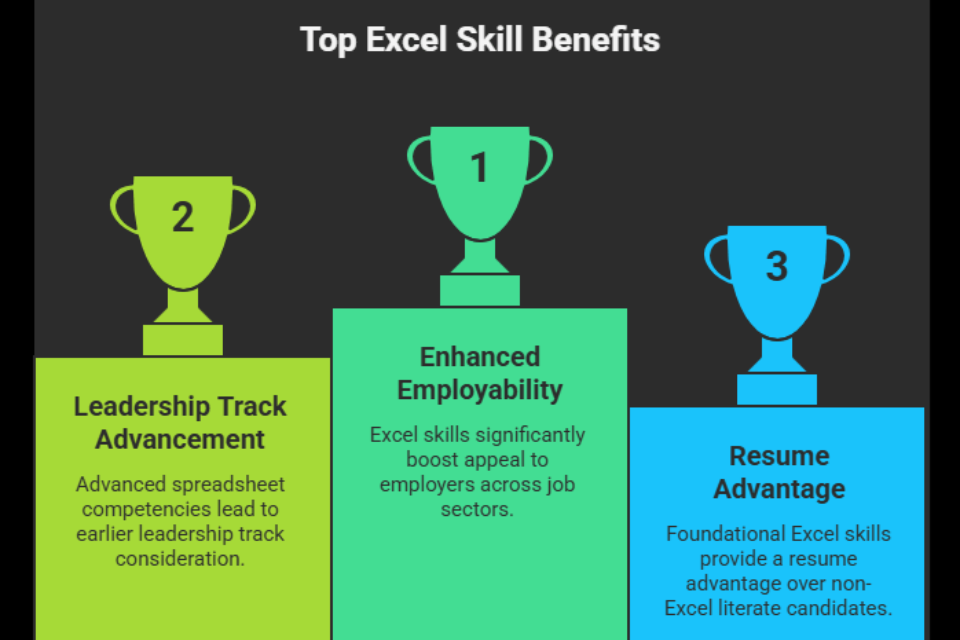
Learning Excel significantly boosts your appeal to employers across job sectors. Many job descriptions even for entry‑level roles explicitly list Excel skills as a prerequisite or strong asset.
Examples of roles where Excel skills are often required include:
- Administrative Assistant
- Data Analyst
- Financial Analyst
- Operations Coordinator
- Project Manager
- Human Resources Specialist
According to the LinkedIn Workplace Learning Report, professionals with advanced spreadsheet competencies are not only more likely to get hired but are often considered for leadership tracks earlier than their peers.
Even foundational competencies — like formulas, formatting, and basic charts — give you a resume advantage over candidates without Excel literacy.
Conclusion: Unlock Career Growth with Excel
The benefits of learning Excel extend far beyond simple spreadsheet tasks. Excel empowers professionals to:
- Save time and reduce manual work
- Improve accuracy and reduce costly errors
- Turn data into actionable insights
- Boost career prospects and earning potential
- Collaborate effectively across teams
- Build a foundation for advanced analytics skills
Whether you’re starting your career, aiming for a promotion, or transitioning to a new field, mastering Excel is a strategic investment in your professional future.
Ready to accelerate your career with Excel mastery? Enroll in the Microsoft Office Specialist (MOS) course today to gain practical, job‑ready skills and certification that employers value.
Frequently Asked Questions About DSL vs Safeguarding Officer Roles
Learning Excel helps improve productivity, automate tasks, analyze data efficiently, and make better decisions. It also enhances your employability and career growth opportunities.
Excel saves time by automating calculations, organizing data, and generating reports quickly. Tools like formulas, pivot tables, and macros reduce manual work and increase efficiency.
Yes, Excel is a highly valuable skill across many industries. It helps professionals stand out, qualify for better roles, and increases chances of promotions and salary growth.
Yes, jobs that require Excel skills often offer higher salaries. Advanced Excel skills like data analysis and automation can significantly boost earning potential.
The best way to learn Excel quickly is through a combination of structured courses and hands-on practice. Step-by-step training helps you understand concepts clearly, while real-world exercises allow you to apply what you learn. Regular practice, working on projects, and exploring different Excel features can significantly speed up your learning process.

0 responses on "Benefits of Learning Excel for Career Growth and Productivity"