


Online Safety for Children: A Practical Guide for Parents and Staff
Children use the internet to play games, communicate, complete schoolwork and develop new interests. But knowing how to protect them online is not always straightforward.
Online safety for children means protecting young people from harmful content, unsafe contact, cyberbullying and privacy risks while helping them develop responsible digital habits. Parents and school staff can support children by using appropriate safety settings, discussing online experiences, recognising warning signs and responding promptly when concerns arise.
Keeping children safe online does not mean preventing them from using technology. It means helping them enjoy its benefits while understanding the risks.
This guide explains the practical steps parents, carers and education staff can take to make children’s online experiences safer.
Table of Contents
What Is Online Safety for Children?
Online safety for children involves protecting their physical and emotional wellbeing, personal information and relationships when they use internet-connected devices.
It includes preventing harm, recognising warning signs and helping children make informed decisions about what they see, share and do online.
For example, a child might understand why sharing their home address is unsafe but not realise that a photograph showing their school uniform could reveal personal information.
Understanding what safeguarding means helps parents and school staff recognise why online protection matters. Knowing the difference between safeguarding and child protection also helps them distinguish everyday prevention from responding to serious concerns.
Internet safety requires more than parental controls. Children need trusted adults who listen, answer questions and help them deal with uncomfortable situations.
What Are the Main Online Risks for Children?
Understanding common online risks helps adults recognise problems without treating every online interaction as dangerous.
Online risks can range from unwanted messages and privacy breaches to serious abuse and exploitation. Understanding the categories of child abuse can help adults recognise when harmful online behaviour may indicate a wider safeguarding concern.
The following examples highlight common digital risks that parents and school staff should know about.
| Online Risk | What It Can Look Like |
|---|---|
| Cyberbullying | Hurtful messages, threats, humiliation or exclusion in group chats. |
| Harmful content | Distressing videos, violent material or content promoting harmful behaviour. |
| Online grooming | Someone building trust to manipulate, abuse or sexually exploit a child. |
| Privacy risks | Sharing home addresses, school details, passwords or live locations. |
| Scams and impersonation | Fake profiles, suspicious links or requests for personal information. |
Cyberbullying and Harmful Content
Cyberbullying can happen through social media, messaging apps and online games. Unlike some face-to-face bullying, harmful messages may reach children outside school hours.
Children may also encounter frightening videos, misleading information or content inappropriate for their age.
Changes in behaviour, reluctance to use a particular app or anxiety after receiving messages may justify a supportive conversation. These signs do not automatically mean abuse has occurred.
Online Grooming and Unsafe Contact
Online grooming involves someone building a relationship with a child to manipulate, exploit or sexually abuse them.
A person may pretend to be younger, offer gifts, request secrecy or pressure a child to move conversations to private platforms. Recognising the signs of online grooming can help parents and teachers identify concerning behaviour and take appropriate action.
Children should understand that someone they know only through a game or social platform may not be who they claim to be.
Privacy Risks, Scams and Personal Information
Children can accidentally reveal personal details through photographs, public profiles, location features or conversations.
Fake giveaways and suspicious links may also encourage them to share information or account passwords. Simple privacy rules help reduce these risks without making children fearful of using technology.
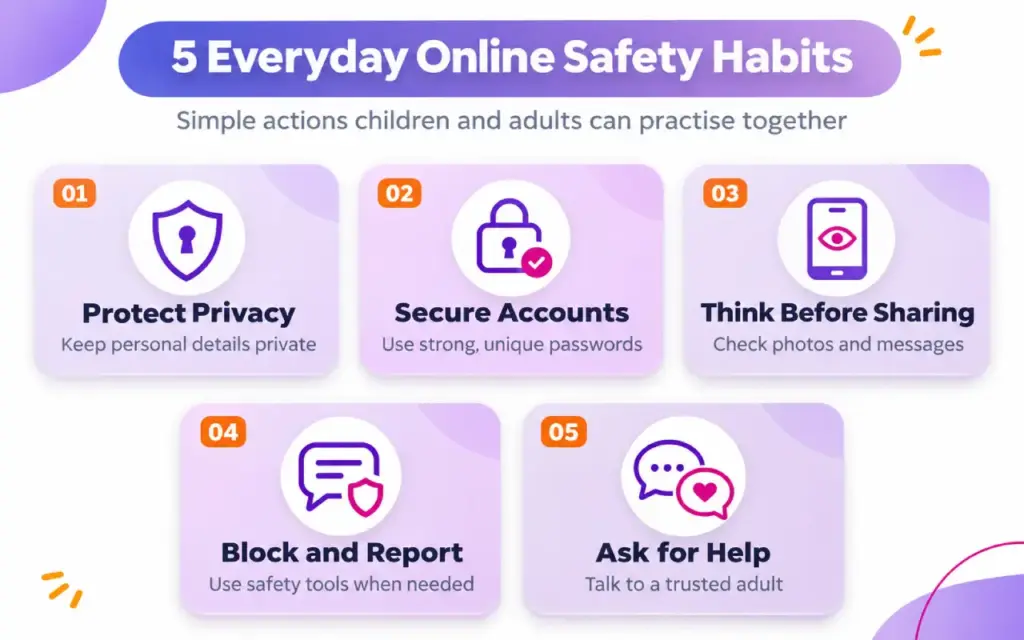
10 Practical Online Safety Tips for Children
The following online safety tips for children provide a starting point for safer internet use at home and school.
Adults should adapt them to each child’s age, understanding and level of independence.
1. Check Privacy and Safety Settings Together
Review the privacy settings on devices, apps, games and social media accounts.
Where available, limit who can see a child’s profile, contact them or view their location.
Parents can use the UK Government’s online safety advice to find guidance on safer devices, parental controls and online conversations.
Review settings regularly because apps and children’s needs can change.
2. Keep Personal Information Private
Explain why children should avoid sharing their home address, school, telephone number, passwords or daily routine with unfamiliar people online.
Photographs deserve attention too. A picture showing a school badge or identifiable location may reveal more than intended.
Encourage children to ask before posting information about themselves or others.
3. Use Strong Passwords and Protect Accounts
Help children create long, unique passwords for important accounts.
Passwords should not be shared with friends or strangers. Where supported, enable two-step verification for additional protection.
Younger children may need adult help managing their login details securely.
If an account appears compromised, change its password using the service’s official recovery process.
4. Check Games and Apps Before Using Them
Before downloading an app, review its age rating, communication features, privacy settings and in-app purchases.
An age rating provides useful guidance but does not guarantee that every interaction will be suitable.
Check whether children can receive messages from strangers or join public conversations.
For younger children, consider using the app together before allowing independent access.
5. Be Careful With Unfamiliar Online Contacts
Explain that online friendships need the same caution as relationships outside the internet.
Someone using a friendly profile picture or claiming to be the same age may not be telling the truth.
Children should never feel pressured to share private information, photographs or secrets.
If someone asks them to hide conversations from trusted adults, they should seek help.
6. Think Before Sharing Photos or Messages
Ask children to consider who might see something they post.
Could a photograph reveal their location? Would they feel comfortable if a message were shared beyond its intended audience?
Discuss consent and explain why they should ask before posting photographs of friends.
Deleting content does not guarantee that every copy disappears.
7. Recognise Suspicious or Harmful Content
Encourage children to question surprising claims, threatening messages and unexpected links.
Not everything online is accurate. Images, videos and messages can be edited or created using artificial intelligence.
Children should avoid opening suspicious links or providing personal information in response to unexpected requests.
When uncertain, they can check with a trusted adult.
8. Set Healthy Boundaries Around Screen Use
Agree on sensible routines that leave room for sleep, schoolwork, physical activity and relationships.
A family agreement might cover device use during meals, bedtime routines and what to do when online activities become upsetting.
There is no single screen-time rule that suits every child. Consider age, circumstances, content and how internet use affects everyday life.
9. Block and Report Uncomfortable Interactions
Show children where to find blocking, muting and reporting tools on the services they use.
Explain that blocking someone who behaves inappropriately is a reasonable safety decision.
If bullying, threats or suspicious contact occur, children should tell a trusted adult rather than handle the situation alone.
Serious concerns may require additional safeguarding action.
10. Tell a Trusted Adult When Something Feels Wrong
Children should know they can ask for help even if they have broken a family rule or shared something they regret.
Make it clear that adults will listen without automatically blaming them.
Practise simple phrases such as, “Someone online is making me uncomfortable,” or “I need help with a message.”
Knowing how to seek support is one of the most valuable online safety skills.
Staying Safe on Social Media, Online Games and Messaging Apps
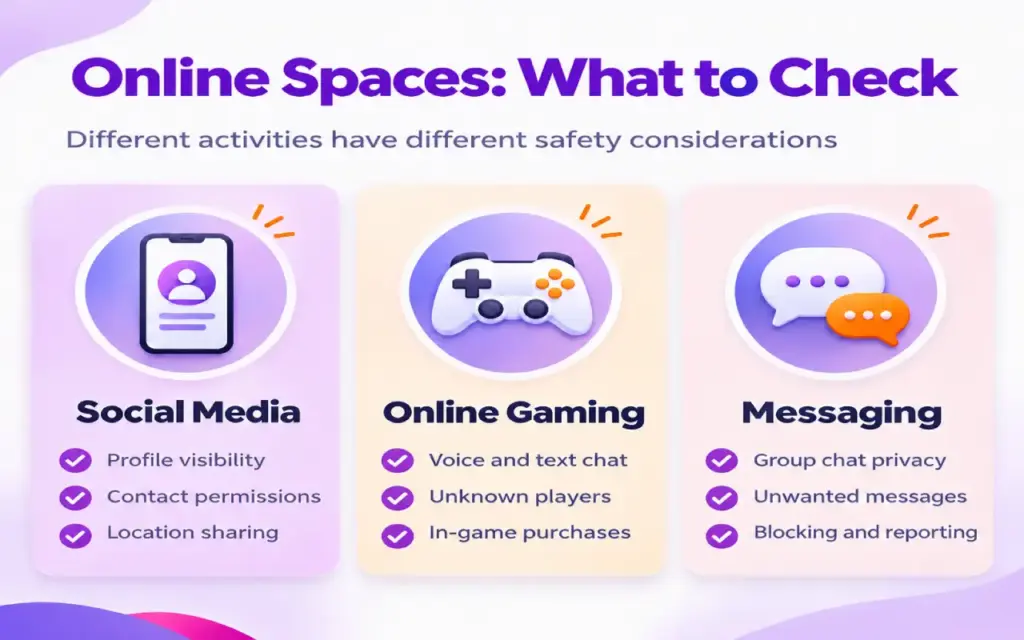
Different online activities create different safety challenges. Parents and school staff should understand the features children use rather than focusing only on the names of platforms.
Social Media and Messaging Safety
Social media accounts can expose children to unfamiliar contacts, public comments and unwanted messages.
Check account visibility, contact permissions, location sharing and available safety tools. Follow applicable minimum-age requirements.
Group chats also need attention. Children may experience bullying, pressure to share photographs or unwanted exposure to inappropriate material.
Encourage them to leave harmful conversations and tell an adult.
AI-generated images and messages can make misleading content appear convincing. Explain that a realistic-looking image or friendly message is not necessarily genuine.
Online Gaming Safety
Multiplayer games often include voice chat, private messaging and opportunities to interact with unknown players.
Review communication settings and consider limiting contact to approved friends where appropriate.
Discuss in-game purchases, account security and requests to continue conversations on other platforms.
A child enjoying a game does not automatically mean every interaction within it is safe.
Regular conversations about who they play with and what happens during games can help adults recognise concerns early.
How Can Parents Talk to Children About Online Safety?
Open conversations help children develop judgement and make it easier for them to seek support.
Instead of beginning with warnings, ask what they enjoy online.
Questions such as “What games are popular with your friends?” or “Has anything online made you uncomfortable?” invite discussion without assuming something is wrong.
Keep Conversations Open and Age-Appropriate
For younger children, use simple examples about private information, strangers and asking permission.
Older children may benefit from conversations about digital footprints, online relationships, consent and managing peer pressure.
Agree on family expectations together where possible.
If a child reports a problem, listen before deciding what action is needed. Avoid reacting in ways that could discourage future disclosures.
Adapt Support to Each Child’s Needs
Children develop digital independence at different rates.
Some children with special educational needs and disabilities (SEND) may benefit from visual explanations, repeated practice or accessible communication methods.
Others may need additional support recognising manipulation or interpreting social situations.
Avoid assumptions based solely on a diagnosis. Consider the individual child’s understanding, communication preferences and support needs.
The goal is appropriate protection without unnecessarily restricting positive online experiences.
How Can Teachers and School Staff Promote Online Safety?
Online safety in schools is part of safeguarding, not simply an IT responsibility.
Teachers, teaching assistants and other school staff can help children recognise risks, practise respectful communication and understand how to report concerns.
Teach Safe Online Behaviour
Use appropriate classroom opportunities to discuss online privacy, cyberbullying, misleading information and respectful behaviour.
Short scenarios can help pupils consider realistic situations.
For example, ask what they would do if an unfamiliar player requested their school name or sent an upsetting message.
Staff should reinforce consistent safety messages and help pupils identify trusted adults.
Schools also need appropriate systems to reduce exposure to harmful online material.
The Department for Education’s filtering and monitoring standards explain the recommended approach for schools and colleges in England. Filtering helps prevent access to harmful material, while monitoring helps identify concerning activity.
Follow School Safeguarding Procedures
In England, Keeping Children Safe in Education 2026 is the statutory safeguarding guidance for schools and colleges.
All school and college staff must read Part One in full and understand their setting’s safeguarding policies.
Staff should know who their designated safeguarding lead (DSL) and deputy are and how concerns should be recorded and reported.
They should not investigate suspected abuse independently.
Education and safeguarding arrangements differ across England, Scotland, Wales and Northern Ireland. Staff must follow the requirements applicable to their setting.
What Should You Do if a Child Experiences Online Harm?
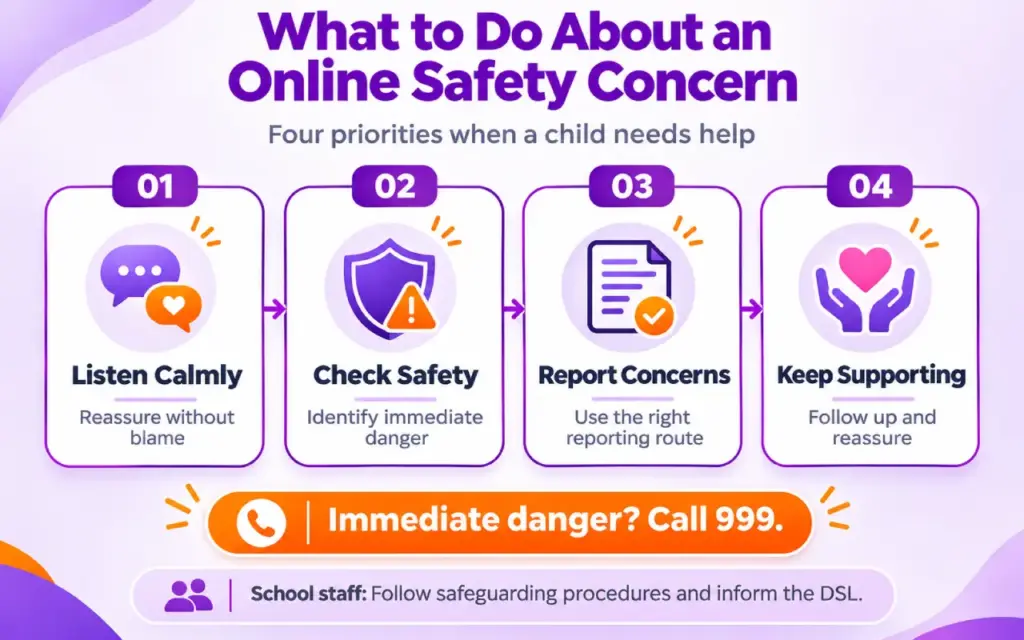
If a child encounters something harmful online, their immediate safety and wellbeing come first.
The right response depends on what happened and whether the child faces ongoing danger.
Listen, Reassure and Check Immediate Safety
Stay calm and allow the child to explain what happened in their own words.
Avoid blaming them, asking leading questions or promising absolute secrecy.
If someone is threatening or pressuring the child, help them stop contact safely and seek appropriate support.
Do not confront a suspected abuser or attempt your own investigation.
If a child is in immediate danger, call 999.
School staff should report safeguarding concerns promptly through their organisation’s procedures.
If a concern involves nude or semi-nude images of someone under 18, school staff should report it immediately to the designated safeguarding lead. They should not ask to see, download, copy, save or forward the images. The DSL should follow the relevant safeguarding guidance. The Department for Education’s guidance on sharing nudes and semi-nudes explains the appropriate response for education settings in England.
Report Concerns Through the Right Channel
Not every online problem should be reported in the same way.
For suspected online child sexual abuse or grooming, parents and carers can follow CEOP’s reporting guidance.
CEOP does not handle routine reports of cyberbullying, fake profiles or account hacking.
Other concerns may require platform reporting, support from the child’s school or contact with the relevant authorities.
School staff must follow safeguarding procedures and inform the DSL or deputy without delay. Where a referral is necessary, it must not be delayed because a particular member of staff is unavailable.
Children should be reassured that speaking up was the right decision.
Helping Children Stay Safer Online
Effective online safety grows from everyday habits: checking privacy settings, discussing online experiences, recognising risks and making it easy for children to ask for help.
Parents and school staff do not need to understand every new app to provide meaningful support. They do need to remain involved, respond calmly and recognise when specialist help is required.
For adults seeking broader child protection knowledge, Nextgen Learning’s Safeguarding Children course covers safeguarding principles, recognising abuse, responding to disclosures, risk assessment and reporting procedures.
The course offers CPD-accredited training with optional certificates available for additional fees, including a non-regulated QLS-endorsed certificate. It is not a regulated professional qualification or a substitute for an employer’s required safeguarding training.
Frequently Asked Questions
The five basic rules are to protect personal information, use suitable privacy settings, avoid sharing sensitive content, be cautious with unfamiliar contacts and tell a trusted adult about anything worrying. Adults should explain these rules using examples appropriate to the child’s age.
Children should begin learning simple online safety habits when they first use internet-connected devices. Younger children can practise asking permission and keeping information private. As they grow, conversations can cover social media, online relationships and digital independence.
No. Parental controls can help restrict inappropriate content, manage access and limit certain interactions, but they cannot prevent every risk. Regular conversations, age-appropriate supervision and children’s confidence in asking for help remain essential.
They should stop engaging with the person and tell a trusted adult. Blocking and reporting tools may also help. If the situation involves threats, sexual exploitation or immediate danger, adults should seek appropriate safeguarding or emergency assistance.
Teachers can promote safe digital behaviour, explain common risks and provide opportunities for pupils to discuss online concerns. They must also follow their school’s safeguarding policies, recognise potential harm and report concerns promptly through the appropriate procedures.
Parents can report suspected online child sexual abuse or grooming to CEOP. Cyberbullying and other harmful interactions may be reported through the relevant platform and discussed with the child’s school. If a child is in immediate danger, call 999.