




25 Best Websites for Teachers: UK Teaching Resources & Tools
Finding the best websites for teachers can save hours of planning, resource creation and classroom preparation. However, with thousands of teaching platforms available, it can be difficult to know which ones are genuinely useful and which simply add more clutter.
Therefore, this guide focuses on practical teacher websites that support real classroom needs. Whether you are looking for lesson-planning resources, interactive activities, SEND support, professional development, productivity tools or AI-assisted teaching, the aim is to help you choose resources that fit your role and save time.
Importantly, the websites included here have been considered for their practical value, ease of use, accessibility, resource quality and relevance to UK educators. Some are completely free, while others offer useful free features alongside paid options.
Rather than bookmarking dozens of platforms at once, start with the tools that solve your most immediate teaching challenge. As a result, you can build a more focused digital toolkit without creating unnecessary workload.
Table of Contents
How We Chose the Best Websites for Teachers
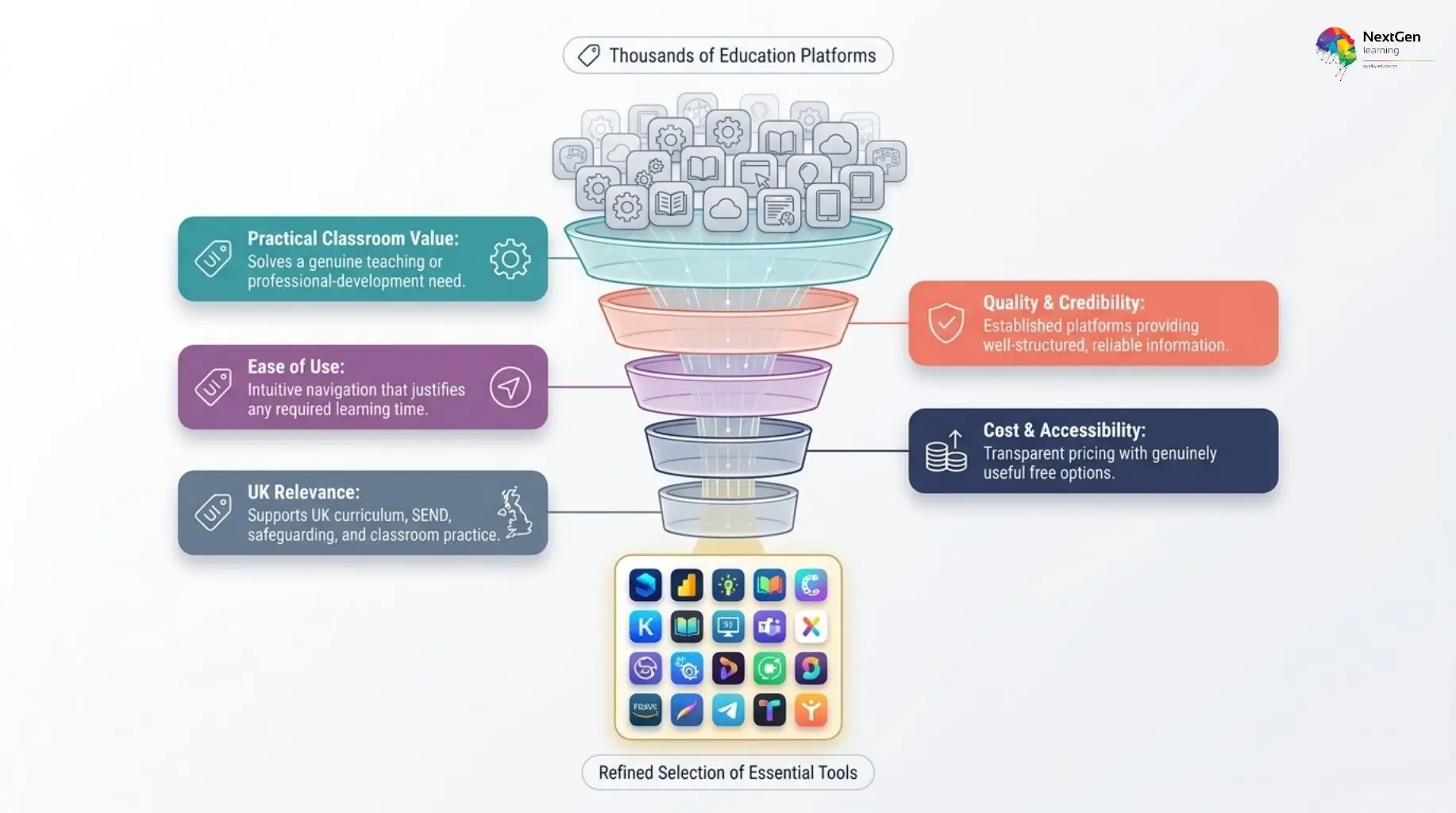
With thousands of education platforms available, a long list is only useful if the websites have been selected for clear reasons. Therefore, the 25 resources in this guide are assessed against practical criteria that matter to teachers, teaching assistants, trainers and other education professionals.
Practical classroom value
First, each website should solve a genuine teaching or professional-development need. For example, a strong resource may help with lesson planning, assessment, student engagement, differentiation, classroom organisation or professional learning.
Quality and credibility
Moreover, useful teaching websites should provide reliable and well-structured information. We have therefore prioritised established education platforms, recognised organisations and tools that offer practical resources rather than low-value content.
Ease of use
Teachers often work under significant time pressure. Consequently, a resource should be easy to navigate and should help users find relevant materials quickly. Complex platforms can still be useful, but they need to provide enough value to justify the extra learning time.
Cost and accessibility
In addition, we considered whether each platform offers genuinely useful free resources or whether important features require payment. A paid platform can still provide excellent value; however, teachers should know what they can access before committing.
Relevance to UK educators
Finally, we have given additional weight to websites that support UK education contexts. This includes resources linked to curriculum planning, SEND, safeguarding, teacher development and classroom practice.
Best Websites for Lesson Planning and Teaching Resources
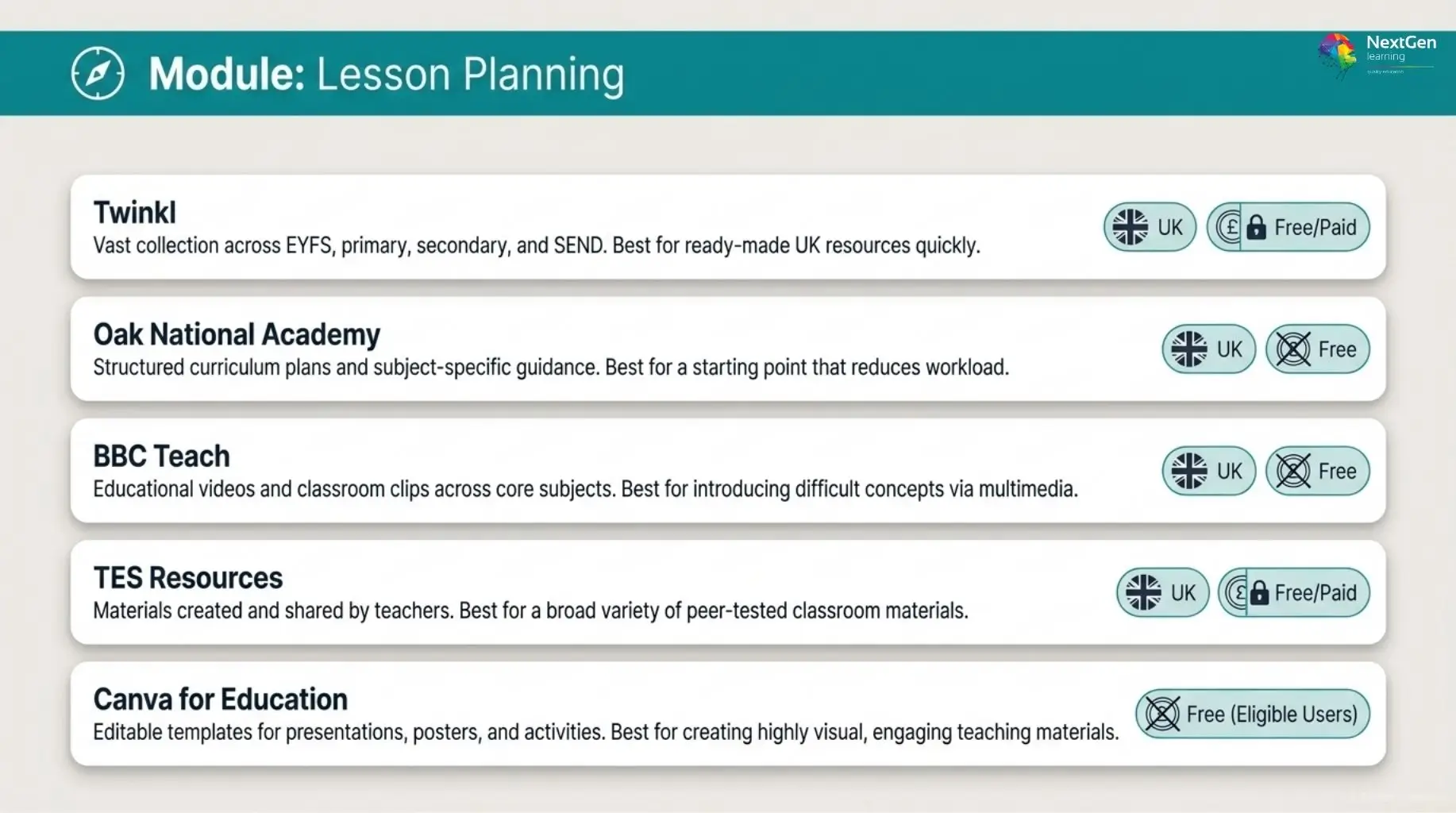
Strong lesson-planning websites can reduce preparation time while giving teachers fresh ideas for classroom delivery. However, the most useful platforms do more than provide worksheets. They should help educators find adaptable resources, support curriculum planning and respond to different learner needs.
1. Twinkl
Twinkl offers a large collection of teaching materials, including worksheets, lesson plans, presentations, activity packs, assessments and classroom displays. Importantly, its strong UK focus makes it especially useful for teachers working across EYFS, primary, secondary and SEND settings.
Teachers can search by subject, age, topic or curriculum area. Therefore, it can be particularly valuable when you need classroom-ready resources quickly.
- Best for: Ready-made UK teaching resources
- Free option: Selected resources are available
- Useful because: It covers a wide range of subjects, age groups and learning needs
- Consider: Full access to many resources requires a subscription
2. BBC Teach
BBC Teach provides free educational videos, classroom clips, lesson ideas and subject-based resources. Moreover, its content covers areas such as English, maths, science, history, geography, music and religious education.
Because video can help introduce difficult concepts or stimulate discussion, BBC Teach works particularly well as a supporting resource rather than a complete lesson-planning platform.
- Best for: Educational videos and lesson inspiration
- Free option: Yes
- Useful because: Teachers can quickly add high-quality multimedia to lessons
- Consider: You may need additional activities or assessment materials around the content
3. Oak National Academy
Oak National Academy is particularly valuable for UK teachers who want structured curriculum and lesson-planning support. It provides curriculum plans, teaching resources, lesson materials and subject-specific guidance across multiple key stages.
In addition, teachers can use its materials as a starting point rather than building every lesson from scratch. This can reduce workload while still allowing educators to adapt content for their own classes.
- Best for: Curriculum planning and structured lessons
- Free option: Yes
- Useful because: Resources are designed with UK classroom contexts in mind
- Consider: Teachers should still adapt materials to their pupils and school curriculum
4. TES Resources
TES Resources gives educators access to materials created and shared by teachers. As a result, users can find worksheets, presentations, schemes of work, revision activities and subject-specific resources across many age groups.
The variety is a major strength. However, because resources come from different contributors, quality and teaching style can vary.
- Best for: Teacher-created classroom materials
- Free option: Yes, alongside paid resources
- Useful because: It offers a broad range of subjects and resource types
- Consider: Review materials carefully before classroom use
5. Canva for Education
Canva for Education is useful when teachers need to create visually engaging resources rather than download conventional worksheets. For example, educators can design presentations, posters, infographics, worksheets, classroom displays and learning activities using editable templates.
Furthermore, reusable templates can save time once teachers develop a consistent resource style.
- Best for: Creating visual teaching materials
- Free option: Education access is available for eligible users
- Useful because: Templates make professional-looking resources easier to produce
- Consider: Good design should support learning rather than distract from the lesson
Best Websites for Student Engagement and Interactive Learning
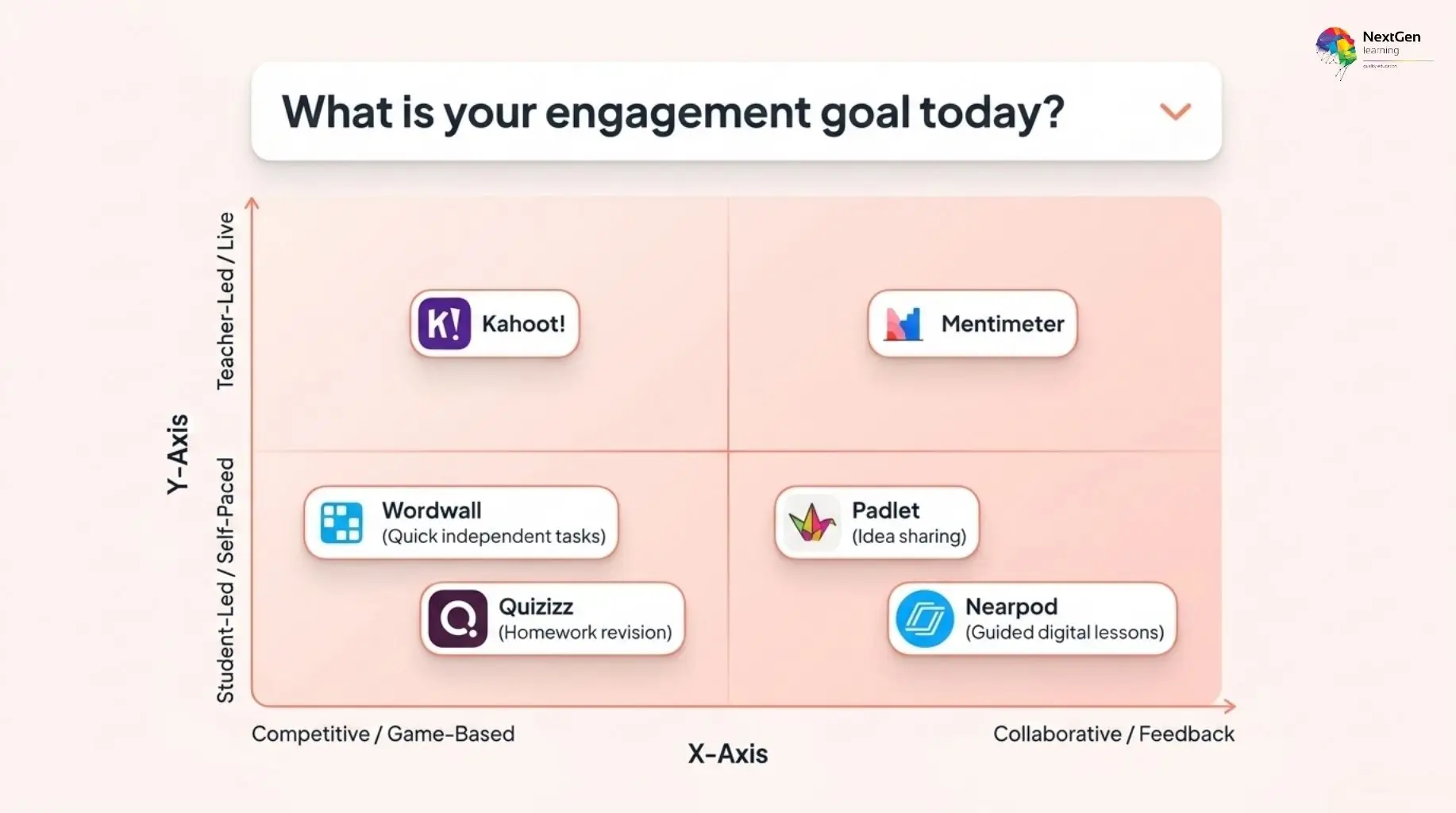
Interactive tools can make lessons more participatory, but engagement should always support learning rather than distract from it. Therefore, the strongest platforms are those that help teachers check understanding, encourage participation and make classroom activities easier to manage.
6. Kahoot!
Kahoot! is one of the best-known platforms for live classroom quizzes and game-based learning. Teachers can create question sets, run real-time competitions and quickly see how well students understand a topic.
Moreover, it works well for revision, retrieval practice and quick formative assessment.
- Best for: Live quizzes and whole-class engagement
- Free option: Yes
- Useful because: It gives immediate feedback on student understanding
- Consider: Competitive formats may not suit every learner or activity
7. Quizizz
Quizizz supports both live and self-paced quizzes, which gives teachers more flexibility than purely live-response tools. In addition, educators can use it for homework, revision, assessment and independent practice.
Because students can work at their own pace, it can be useful when classes contain different confidence levels.
- Best for: Self-paced and live assessment
- Free option: Yes
- Useful because: It supports classroom and independent learning
- Consider: Some advanced features require paid access
8. Wordwall
Wordwall helps teachers create interactive activities such as matching games, quizzes, word searches, sorting tasks and random-wheel exercises. Importantly, many templates can also be converted into printable activities.
Therefore, it is particularly useful for primary classrooms, language teaching and short reinforcement activities.
- Best for: Quick interactive classroom activities
- Free option: Limited free access
- Useful because: Templates make activity creation fast
- Consider: The free plan limits how many activities users can create
9. Mentimeter
Mentimeter allows teachers to run polls, quizzes, word clouds, ranking activities and live audience responses. As a result, quieter learners can participate without always having to speak in front of the whole class.
It can work especially well in secondary education, further education, higher education and professional training.
- Best for: Polls, feedback and class participation
- Free option: Yes, with limitations
- Useful because: It gives teachers instant responses from the group
- Consider: Some presentation and interaction features sit behind paid plans
10. Nearpod
Nearpod combines presentations with interactive learning activities. Teachers can add quizzes, polls, collaborative tasks, videos and formative checks directly into a lesson.
Consequently, it can reduce the need to switch between multiple platforms during one session.
- Best for: Interactive digital lessons
- Free option: Yes
- Useful because: It combines teaching content and assessment in one lesson flow
- Consider: Teachers may need preparation time to build more detailed lessons
11. Padlet
Padlet provides collaborative digital boards where students and teachers can share notes, images, links, ideas and responses. For example, a teacher might use a board for brainstorming, group research, exit tickets or collecting questions.
Moreover, its visual format makes it useful for collaborative learning and project work.
- Best for: Collaboration and idea sharing
- Free option: Limited free access
- Useful because: Students can contribute to a shared space quickly
- Consider: Teachers should organise boards carefully to prevent them becoming cluttered
Best Websites for SEND, Differentiation and Inclusive Teaching
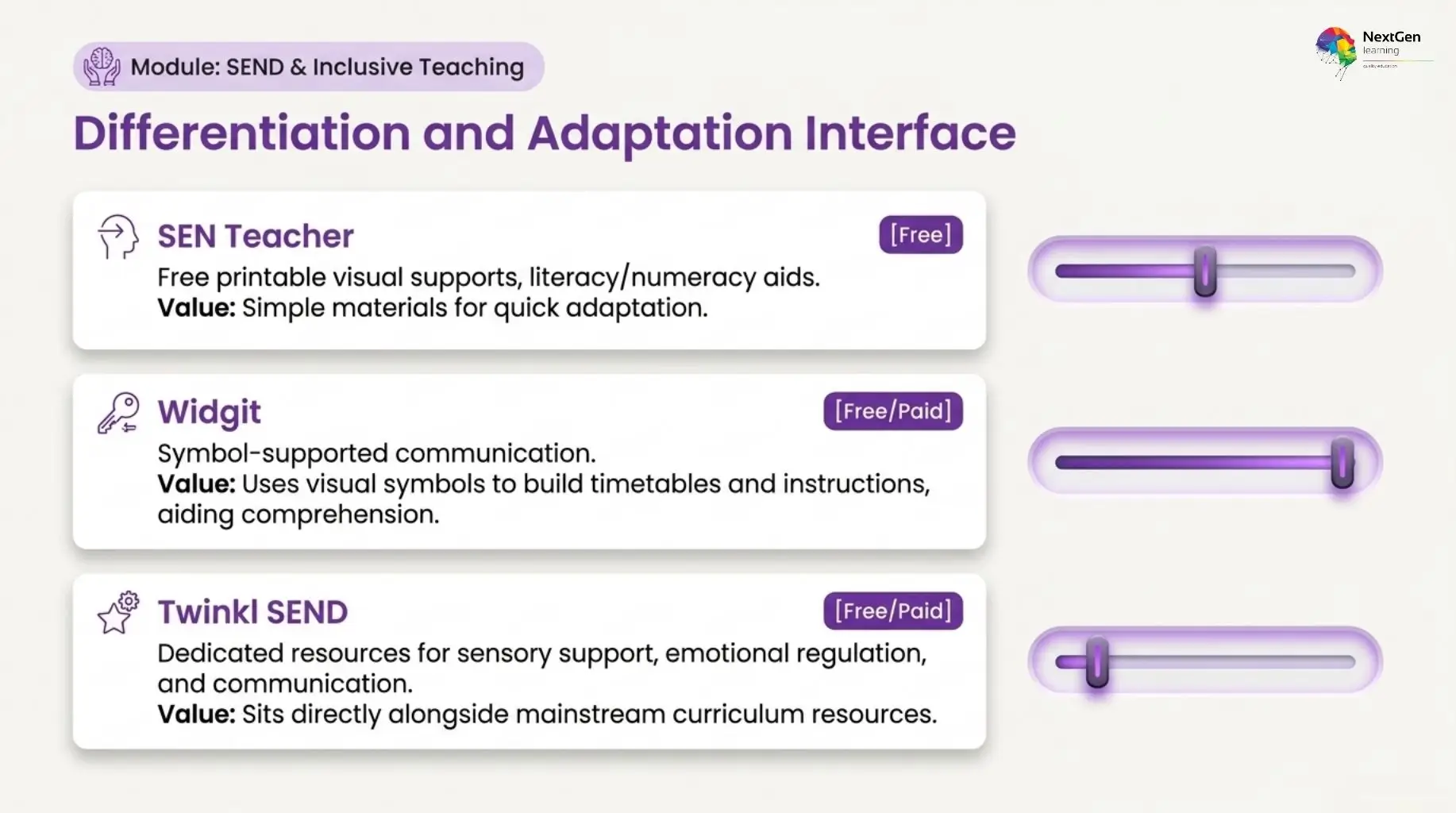
Inclusive teaching resources can help educators adapt lessons for different abilities, communication needs and learning preferences. However, no single platform can meet every learner’s needs. Therefore, teachers should use these websites as supporting tools and adapt resources to the individual pupil, classroom context and professional guidance available within their setting.
12. SEN Teacher
SEN Teacher provides free printable resources designed for learners with special educational needs and disabilities. Its materials include visual supports, literacy and numeracy activities, communication resources, classroom aids and printable worksheets.
Because the website focuses specifically on SEND, it can be particularly useful when teachers need simple materials that they can adapt quickly.
- Best for: Free SEND classroom resources
- Free option: Yes
- Useful because: It provides practical materials for different learning needs
- Consider: Teachers should adapt resources to each learner rather than use them as one-size-fits-all solutions
13. Widgit
Widgit is widely associated with symbol-supported communication and accessible learning materials. Teachers can use symbols to make instructions, timetables, classroom displays and learning activities easier to understand.
Moreover, visual communication can support learners who benefit from additional structure or alternative ways of accessing written information.
- Best for: Symbol-supported and accessible learning resources
- Free option: Some resources are available, while specialist tools may require payment
- Useful because: Visual symbols can support communication and comprehension
- Consider: Choose symbols and materials according to the learner’s specific communication needs
14. Twinkl SEND
Twinkl SEND provides dedicated resources for areas such as communication, sensory support, emotional regulation, literacy, numeracy and differentiated learning. In addition, teachers can find visual aids and classroom resources designed for learners who need additional support.
Since Twinkl also covers mainstream curriculum resources, educators can use both areas together when adapting lessons.
- Best for: Differentiated and SEND-focused teaching materials
- Free option: Selected resources are available
- Useful because: SEND materials sit alongside wider curriculum resources
- Consider: Many resources require subscription access
Best Websites for Teacher CPD and Professional Development
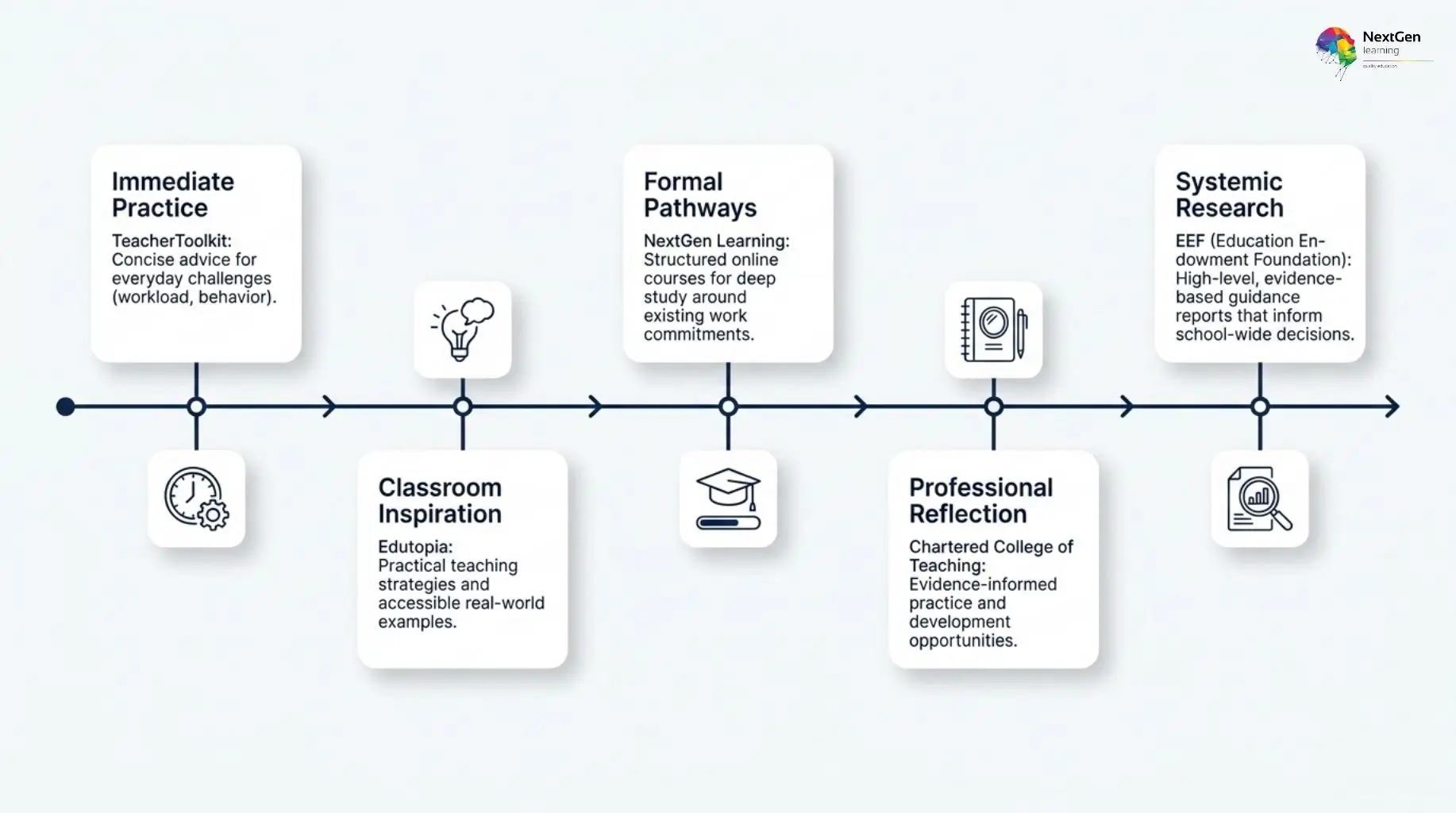
Professional development helps teachers strengthen subject knowledge, improve classroom practice and stay current with changes in education. However, useful CPD should go beyond passive reading. Therefore, the best platforms combine practical guidance, research, training or structured learning opportunities.
15. Education Endowment Foundation
The Education Endowment Foundation (EEF) provides evidence-informed guidance for schools and educators. Its resources cover areas such as teaching and learning, literacy, behaviour, implementation and professional development.
Moreover, the guidance reports can help teachers and school leaders make more informed decisions about classroom strategies.
- Best for: Evidence-informed teaching guidance
- Free option: Yes
- Useful because: It translates education research into practical recommendations
- Consider: Guidance should still be adapted to the needs of individual schools and learners
16. Chartered College of Teaching
The Chartered College of Teaching supports professional learning through research, articles, resources, events and development opportunities for teachers.
Importantly, it places strong emphasis on evidence-informed practice and professional reflection. Therefore, it can be useful for educators who want to develop their teaching beyond day-to-day classroom resources.
- Best for: Professional learning and research-informed practice
- Free option: Some resources are accessible, while membership benefits may require payment
- Useful because: It focuses specifically on teacher development
- Consider: Some professional resources sit within membership access
17. Edutopia
Edutopia publishes articles, videos and classroom examples covering teaching strategies, assessment, project-based learning, wellbeing, technology and student engagement.
Although it is US-based, many of its broader teaching ideas can still provide useful inspiration for UK educators. However, teachers should adapt examples to their own curriculum and school context.
- Best for: Practical teaching ideas and classroom strategies
- Free option: Yes
- Useful because: It combines accessible articles with real classroom examples
- Consider: Some terminology and curriculum references are US-focused
18. TeacherToolkit
TeacherToolkit focuses on practical issues that teachers regularly face, including workload, assessment, behaviour, lesson planning and professional development.
Consequently, it can be useful for educators looking for concise ideas that connect directly with classroom practice.
- Best for: Practical teacher development and classroom advice
- Free option: Many articles and resources are accessible
- Useful because: Content focuses on everyday teaching challenges
- Consider: Readers should evaluate individual recommendations against their own school policies and context
19. NextGen Learning
NextGen Learning provides structured online courses across education-related areas such as teaching, safeguarding, SEND, communication and professional skills. Unlike article-based websites, structured online learning can be useful when educators want to study a topic in greater depth and follow a defined learning pathway.
In addition, flexible online study can help teachers, teaching assistants and other education professionals build knowledge around existing work commitments.
- Best for: Structured online professional development
- Access: Course availability and pricing vary
- Useful because: Learners can study specific professional topics in a structured format
- Consider: Always check that a course matches your role, development goal and any qualification requirements before enrolling
Best Productivity and Organisation Websites for Teachers
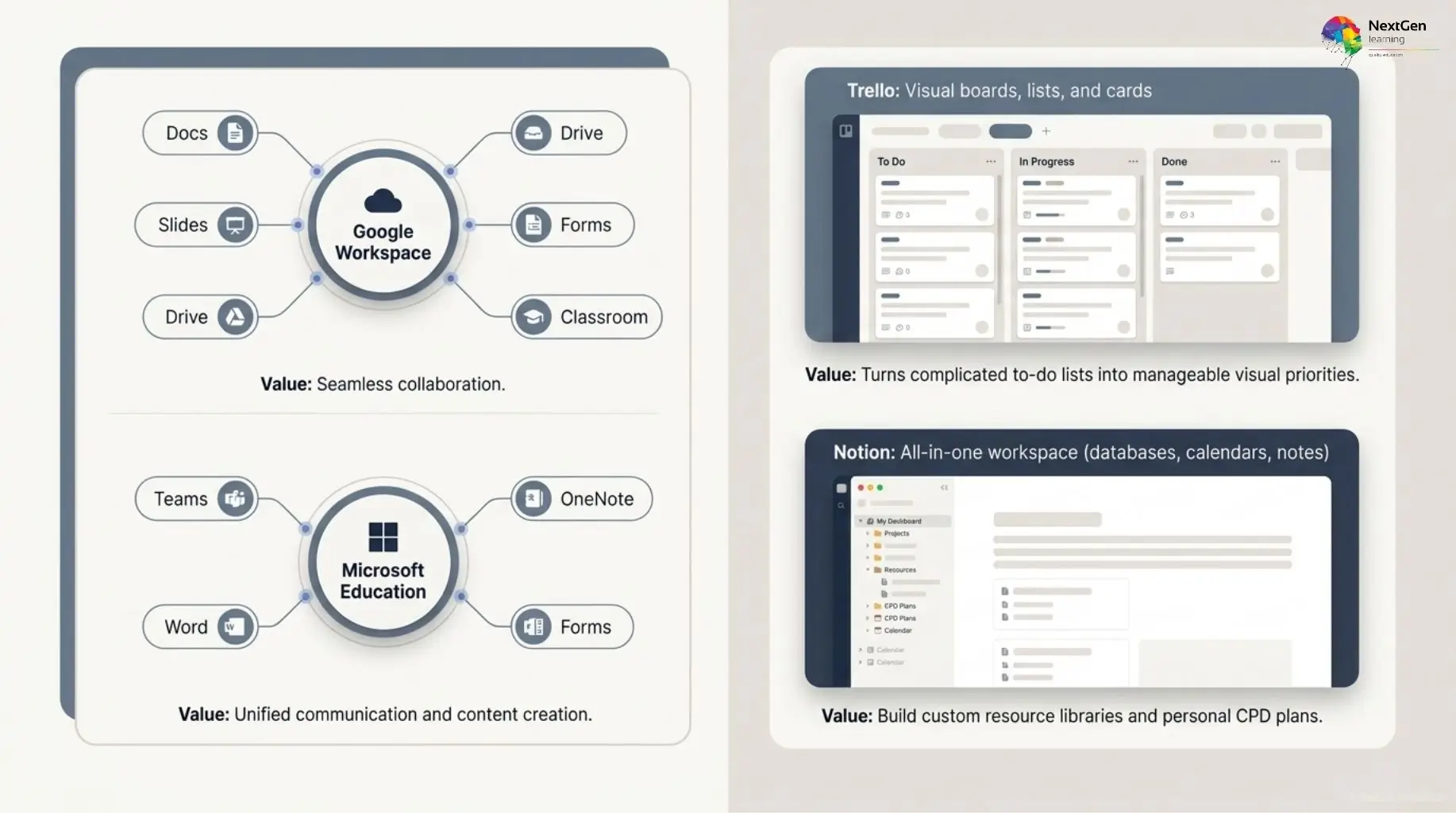
Teachers often manage lesson plans, resources, meetings, assessments and administrative tasks at the same time. Therefore, the right productivity platform can reduce unnecessary organisation and keep teaching materials easier to access.
20. Google Workspace for Education
Google Workspace for Education brings tools such as Google Docs, Slides, Drive, Forms and Classroom into one connected environment. Teachers can create resources, collect work, collaborate with colleagues and organise files without constantly moving between separate systems.
- Best for: Collaboration and classroom organisation
- Free option: Available to eligible education institutions
- Useful because: Multiple teaching and productivity tools work together
- Consider: Availability depends on your institution’s setup and permissions
21. Microsoft Education
Microsoft Education provides tools including Teams, OneNote, Word, PowerPoint and Forms. Consequently, it can work particularly well for schools and colleges that already use Microsoft 365.
Teachers can organise resources, communicate with learners, collect assignments and collaborate with colleagues within one ecosystem.
- Best for: Schools using Microsoft 365
- Useful because: It combines communication, content creation and organisation
- Consider: Features depend on your institution’s licence
22. Trello
Trello uses visual boards, lists and cards to organise tasks. For example, teachers can create separate boards for lesson preparation, marking, meetings, CPD goals or departmental projects.
Moreover, its simple visual structure makes priorities and deadlines easier to see.
- Best for: Task and workload management
- Free option: Yes
- Useful because: It turns complicated to-do lists into manageable workflows
- Consider: It is primarily an organisation tool rather than a teaching platform
23. Notion
Notion combines notes, databases, calendars, checklists and planning pages within one workspace. Therefore, teachers can use it to organise lesson ideas, resource libraries, meeting notes or personal professional-development plans.
- Best for: Personal planning and resource organisation
- Free option: Yes, with additional paid options
- Useful because: Teachers can build a workspace around their own workflow
- Consider: Setting up complex systems can take time, so starting with a simple template is usually more practical
Specialist and Digital Learning Resources
Some teaching websites are most valuable when they support a specific type of learning rather than everyday lesson planning. Therefore, the final two recommendations focus on digital skills and subject enrichment.
24. Quizlet
Quizlet helps teachers and learners create digital flashcards, practice sets, matching activities and revision exercises. It can be especially useful for vocabulary, terminology, factual recall, language learning and exam preparation.
Moreover, students can use many study sets independently, which makes Quizlet useful for both classroom reinforcement and home revision.
- Best for: Revision, vocabulary and retrieval practice
- Free option: Yes, with paid upgrades
- Useful because: Students can revisit key knowledge independently
- Consider: Teachers should review shared study sets before recommending them, as user-created content can vary in quality
25. Scratch
Scratch is a free programming platform developed to help young people learn coding through creative projects. Students can build animations, games, stories and interactive activities using block-based programming.
As a result, it can support computing lessons while also developing problem-solving, logical thinking, creativity and project skills.
- Best for: Coding and computational thinking
- Free option: Yes
- Useful because: Block-based coding makes programming more accessible to beginners
- Consider: Younger learners may still need guidance when planning more complex projects
These final resources broaden the list beyond traditional teaching materials. Quizlet supports knowledge recall and independent revision, while Scratch gives learners a practical way to develop digital and problem-solving skills.
AI Websites and Tools for Teachers
AI tools can support teachers with planning, resource adaptation, assessment ideas and administrative tasks. However, they should assist professional judgement rather than replace it. Teachers should always review AI-generated content for accuracy, suitability, bias and age appropriateness before using it with learners.
Useful ways teachers can use AI
AI can be particularly helpful for:
- generating first-draft lesson ideas
- simplifying or adapting explanations
- creating quiz and discussion questions
- suggesting differentiated activities
- summarising long materials
- producing examples for classroom use
For example, a teacher might use AI to draft three versions of the same explanation for learners with different levels of prior knowledge. However, the teacher should still check the content and adapt it to the class.
What teachers should check before using AI
Importantly, schools and education settings may have their own policies on AI use. Therefore, teachers should consider:
- Accuracy: Verify facts before using AI-generated material.
- Privacy: Avoid entering sensitive pupil or staff information.
- Safeguarding: Follow your organisation’s digital-safety procedures.
- Bias: Review outputs for stereotypes or unbalanced information.
- Professional judgement: Adapt every output to the learner and learning objective.
How to Choose the Right Teacher Website
The best teacher website is not necessarily the platform with the most features. Instead, it is the one that solves a clear problem without adding unnecessary workload. Therefore, start by identifying what you actually need help with before creating another account or adopting another digital tool.
Consider these five checks:
- Start with the problem: Choose a platform for a specific need, such as lesson planning, assessment, SEND support or organisation.
- Check the real cost: Confirm which features are free and which require a subscription.
- Review curriculum relevance: Make sure resources suit your learners, subject, age group and UK education context.
- Consider accessibility: Look for options that support differentiation, communication needs or different ways of accessing content.
- Follow school policies: Before using student-facing or AI-powered tools, check safeguarding, privacy and data-protection requirements.
Frequently Asked Questions
The best websites for teachers depend on the task. Oak National Academy is strong for lesson planning, Twinkl offers broad classroom resources, Kahoot! supports interactive quizzes, EEF is useful for evidence-informed practice, and Google Workspace for Education helps with collaboration and organisation.
Teachers can find free resources through platforms such as BBC Teach, Oak National Academy, Education Endowment Foundation, Scratch, and SEN Teacher. In addition, websites such as Twinkl, TES Resources, Quizlet, and Kahoot! provide some free content alongside paid options.
For lesson planning, Oak National Academy, Twinkl, TES Resources, BBC Teach, and Canva for Education are useful starting points. However, each serves a different purpose. Oak supports structured planning, while Canva is stronger for creating customised visual materials.
UK educators may find Oak National Academy, BBC Teach, Twinkl, TES Resources, Education Endowment Foundation, Chartered College of Teaching, and TeacherToolkit particularly relevant. These platforms offer resources, guidance, or professional learning that connect more directly with UK education contexts.
Yes, AI tools can help with lesson ideas, quiz drafts, simplified explanations, and resource adaptation. However, teachers should always review outputs carefully. In addition, they should follow school policies on privacy, safeguarding, data protection, and appropriate AI use.
Start by checking who created the resource, when it was updated, and whether the information is supported by credible evidence. Moreover, review its curriculum relevance, accessibility, and suitability for your learners. For student-facing tools, also check your organisation’s safeguarding and data policies.
Final Thoughts
The best websites for teachers are the ones that solve a real classroom or professional need without creating extra complexity. Therefore, rather than trying to use every platform on this list, start with one or two resources that match your immediate priority.
For example, you might choose Oak National Academy for lesson planning, Kahoot! for engagement, EEF for evidence-informed guidance or Google Workspace for Education for organisation and collaboration.
Importantly, useful digital tools should support—not replace—professional judgement. Review resources carefully, adapt them to your learners and check relevant school policies where needed.
By building your digital toolkit gradually, you can reduce unnecessary workload, improve resource quality and make online teaching tools genuinely useful rather than overwhelming.


0 responses on "25 Best Websites for Teachers: UK Teaching Resources & Tools"