The Microsoft Teams for End Users course teaches learners how to use Microsoft Teams for communication, online meetings, file sharing, collaboration, and workplace productivity in professional environments.

Microsoft Teams for End Users
- Learn Microsoft Teams for effective workplace communication and collaboration
- CPD-certified training with instant digital certificate
- Master meetings, chat, file sharing, and Microsoft 365 collaboration tools
- Ideal for office employees, remote workers, managers, and business professionals
Improve Workplace Communication & Collaboration
Build the skills to communicate, collaborate, and stay productive using Microsoft Teams. This course teaches you how to manage chats, schedule online meetings, share files, organise teams and channels, and collaborate seamlessly with colleagues through Microsoft 365. Whether you’re new to Microsoft Teams or looking to improve your workplace productivity, this course provides practical knowledge that can be applied in office, remote, and hybrid working environments.
Exclusive Course Glimpse
Course Overview
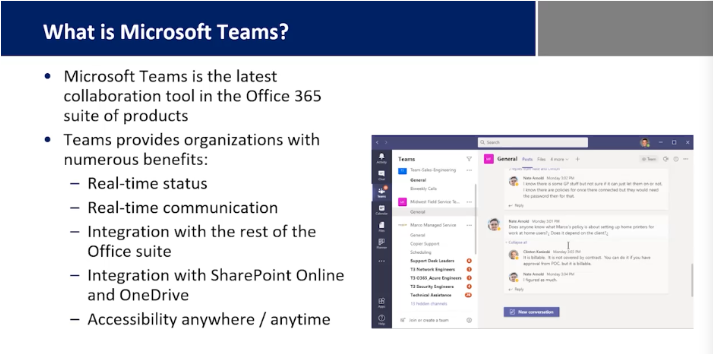
Microsoft Teams has become one of the most widely used workplace collaboration platforms, helping organisations communicate, share files, manage projects, and work together from anywhere. Whether employees work in the office, remotely, or in a hybrid environment, Microsoft Teams supports efficient communication and improves teamwork through messaging, meetings, document collaboration, and integrated productivity tools.
This Microsoft Teams for End Users course provides a comprehensive introduction to Microsoft Teams and its essential features for everyday workplace collaboration. The course explores how to use Teams effectively while helping learners improve communication, organisation, and productivity in professional environments.
Throughout the course, you will gain knowledge of Microsoft Teams, online collaboration, team communication, video meetings, chat, file sharing, Microsoft 365, channels, team management, meeting scheduling, document collaboration, notifications, workplace productivity, and remote working. You will learn how to communicate with colleagues, organise conversations, collaborate on shared files, schedule meetings, and use Microsoft Teams confidently in day-to-day work.
The course also examines team organisation, permissions, collaboration tools, task coordination, meeting features, productivity tips, communication best practices, workspace management, and professional online collaboration. Understanding these areas can help learners work more efficiently while improving teamwork and digital communication skills.
Whether you are an office employee, remote worker, administrator, manager, student, business professional, or anyone looking to improve collaboration using Microsoft Teams, this course provides valuable knowledge that supports workplace success and professional development.
Course Description
This course is designed to help learners develop a strong understanding of Microsoft Teams and its role in workplace collaboration. You will explore the platform’s core features while gaining practical knowledge of communication, meetings, file sharing, and team collaboration.
The course covers key topics including Microsoft Teams, online collaboration, team communication, video meetings, chat, file sharing, Microsoft 365, channels, meeting scheduling, document collaboration, notifications, workplace productivity, and remote working. You will gain practical knowledge of how to organise conversations, collaborate on documents, manage meetings, and improve communication across teams.
You will also examine workspace organisation, collaboration tools, permissions, productivity features, task coordination, communication etiquette, meeting management, and professional collaboration practices. The course highlights the importance of effective communication, organisation, and teamwork in modern workplaces.
By completing this course, learners will develop valuable Microsoft Teams skills while gaining a stronger understanding of workplace collaboration, digital communication, and professional productivity.
What You Will Learn
- Understand the fundamentals of Microsoft Teams
- Learn team communication and collaboration features
- Schedule and manage online meetings
- Share files and collaborate on documents
- Explore Microsoft 365 integration
- Organise teams, channels, and conversations
- Manage notifications and communication settings
- Improve workplace productivity using Teams
- Learn remote and hybrid working best practices
- Develop confidence in using Microsoft Teams professionally
Why Choose Us?
- Gain valuable Microsoft Teams knowledge
- Learn practical workplace collaboration skills
- Improve communication and productivity
- Study online at your own pace
- Develop confidence in using Microsoft Teams
- Strengthen digital workplace skills
- Enhance career development opportunities
- Receive a recognised certificate upon completion
Certificate of Achievement
Upon successful completion of the Microsoft Teams for End Users course, you will be eligible to receive a CPD Certificate, demonstrating your commitment to continuous professional development and industry-focused learning.
A CPD certificate can help strengthen your CV, enhance your professional profile, and showcase your knowledge of Microsoft Teams, online collaboration, video meetings, team communication, file sharing, Microsoft 365, workplace productivity, and remote working.
This certification provides valuable evidence of your learning and can support career progression within administration, business support, customer service, project coordination, office management, and digital workplace roles.
Who Is This Course For?
This course is ideal for:
- Office employees
- Remote workers
- Administrative professionals
- Team members
- Managers
- Business professionals
- Students
- Anyone interested in Microsoft Teams and workplace collaboration
Requirements
There are no formal entry requirements for this Microsoft Teams for End Users course. Whether you are new to Microsoft Teams or looking to strengthen your existing collaboration skills, this course is designed to be accessible to learners of all experience levels.
To enrol, you simply need:
- An interest in Microsoft Teams, workplace collaboration, or Microsoft 365
- Basic English reading and writing skills
- Access to an internet-enabled device such as a computer, laptop, tablet, or smartphone
- A willingness to learn and develop new professional skills
- A minimum age of 16 years
Study from anywhere, at any time, and progress through the course at your own pace.
Career Path
Completing this Microsoft Teams for End Users course can support opportunities in administration, business support, customer service, project coordination, office management, and remote working environments. Moreover, digital collaboration and communication skills are highly valued across modern workplaces that use Microsoft 365 and cloud-based productivity tools.
Common roles include:
Office Administrator:
Manage communication, meetings, documents, and daily administrative tasks using Microsoft Teams
Administrative Assistant:
Support business operations by coordinating meetings, sharing files, and collaborating with colleagues
Business Support Officer:
Assist teams with communication, document management, and workplace coordination using Microsoft Teams
Customer Service Coordinator:
Communicate with customers and internal teams while managing online meetings and shared information
Project Coordinator:
Support project communication, meeting scheduling, document collaboration, and team organisation
Remote Team Member:
Collaborate effectively with colleagues using Microsoft Teams for communication, file sharing, and virtual meetings
Career opportunities may vary depending on qualifications, experience, and workplace requirements.
Order Your Certificate
To order your Certificate, we kindly invite you to visit the following link
Frequently Asked Questions
This course is suitable for office employees, remote workers, administrative professionals, managers, business professionals, students, and anyone who wants to improve their Microsoft Teams skills.
You will gain knowledge of Microsoft Teams, online collaboration, video meetings, team communication, file sharing, Microsoft 365 integration, meeting scheduling, document collaboration, and workplace productivity.
No. This course is suitable for beginners as well as learners who want to improve their Microsoft Teams knowledge and workplace collaboration skills.
Yes. The course explains how to schedule meetings, manage virtual calls, organise channels, share files, collaborate on documents, and communicate effectively using Microsoft Teams.
Microsoft Teams helps organisations improve communication, support remote and hybrid working, simplify collaboration, manage meetings, and increase productivity by bringing messaging, file sharing, and teamwork into one platform.
This training can support roles such as Office Administrator, Administrative Assistant, Business Support Officer, Customer Service Coordinator, Project Coordinator, and Remote Team Member, depending on qualifications, experience, and workplace requirements.
Course Curriculum
| Microsoft Teams for End Users | |||
| Microsoft Teams for End Users | 01:05:00 | ||
| Order Your Certificate | |||
| Order Your Certificate | 00:00:00 | ||


All Courses for £49